Lifecycle Hooks
Lifecycle hooks allow you to run code at specific points during your application's startup and shutdown phases. ExpressoTS provides two complementary lifecycle systems that serve different purposes:
- DI Lifecycle (
@postConstruct/@preDestroy) — instance-level hooks from InversifyJS - Application Lifecycle (
IBootstrap/IShutdown) — application-level hooks from ExpressoTS
Understanding when to use each system is key to building robust, production-ready applications.
Overview
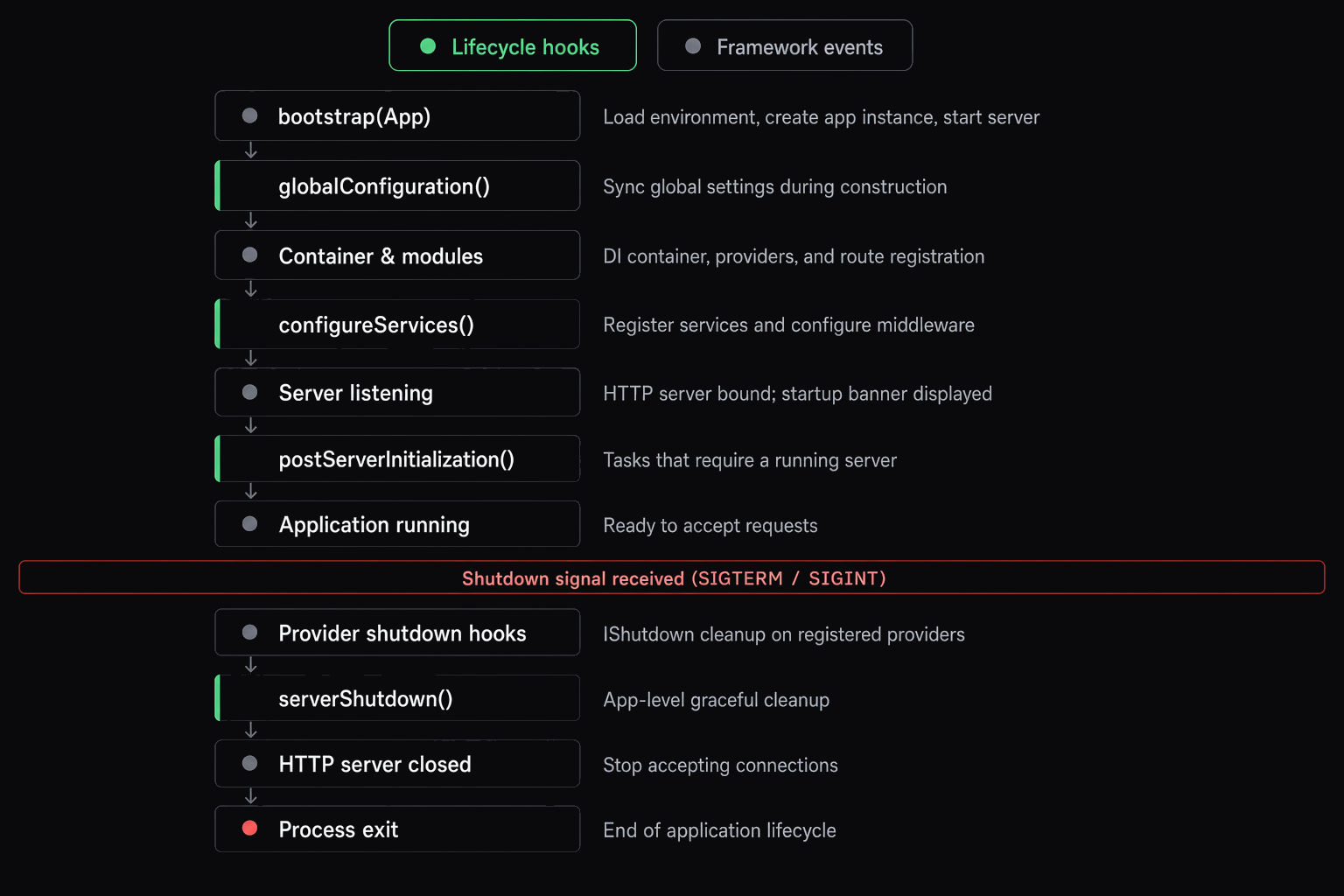
Startup sequence
| Step | Method | Timing |
|---|---|---|
| 1 | globalConfiguration() | Sync, runs in constructor |
| 2 | configureServices() | Sync or async, before server starts |
| 3 | Middleware pipeline setup | Framework-managed |
| 4 | Server starts listening | HTTP port bound |
| 5 | postServerInitialization() | Sync or async, after server is ready |
| 6 | IBootstrap.bootstrap() | All providers in parallel |
| 7 | Application running | Accepting requests |
Shutdown sequence
| Step | Method | Timing |
|---|---|---|
| 1 | Signal received | SIGTERM, SIGINT, SIGHUP |
| 2 | IShutdown.shutdown(signal) | All providers in parallel, error-tolerant, capped by shutdown timeout |
| 3 | serverShutdown(signal) | User hook, capped by shutdown timeout |
| 4 | HTTP server close | Connections drained, server closed |
Lifecycle systems comparison
| Aspect | @postConstruct / @preDestroy | IBootstrap / IShutdown |
|---|---|---|
| Level | DI Container (Instance) | Application (Server) |
| Frequency | Every instance creation | Once per app lifecycle |
| Timing | After constructor / Before disposal | After server ready / On shutdown |
| Signal awareness | No | Yes (shutdown receives signal) |
| Parallel execution | No | Yes (all hooks run in parallel) |
| Error handling | Throws immediately | Bootstrap: fail-fast, Shutdown: error-tolerant |
| Scope requirement | Any scope | Must be Singleton |
| Purpose | Instance initialization | Application initialization |
DI lifecycle hooks
These hooks come from InversifyJS (the underlying DI container) and run at the instance level.
@postConstruct
The @postConstruct decorator marks a method to be called immediately after the class instance is created by the DI container.
import { provide, postConstruct } from "@expressots/core";

@provide(UserService)
class UserService {
    private logger: Logger;

    constructor() {
        // Constructor runs first
    }

    @postConstruct()
    init(): void {
        this.logger = new Logger("UserService");
        console.log("UserService instance initialized");
    }
}
When to use:
- Setting up instance properties that depend on the fully constructed object
- Running synchronous initialization logic
- Validating constructor injection results
@preDestroy
The @preDestroy decorator marks a method to be called immediately before the instance is removed from the DI container.
import { provide, preDestroy } from "@expressots/core";

@provide(ConnectionPool)
class ConnectionPool {
    private connections: Connection[] = [];

    @preDestroy()
    cleanup(): void {
        this.connections.forEach((conn) => conn.close());
        console.log("ConnectionPool disposed");
    }
}
When to use:
- Cleaning up resources when the instance is disposed
- Closing connections or file handles
- Releasing memory or external resources
@postConstruct and @preDestroy are tied to instance creation and disposal in the DI container. They run every time an instance is created or removed, which depends on the scope (Singleton, Request, Transient).
Application lifecycle hooks
These hooks are provided by ExpressoTS and run at the application level, once during startup and shutdown.
IBootstrap interface
Implement IBootstrap to run initialization code after the application is fully ready and listening.
export interface IBootstrap {
    bootstrap(): void | Promise<void>;
}
When is bootstrap() called?
- After the server is fully ready and listening
- After
postServerInitialization()completes - All bootstrap hooks execute in parallel via
Promise.all() - Fail-fast: if any hook throws, the error propagates
import { IBootstrap, provideSingleton } from "@expressots/core";

@provideSingleton(DatabaseService)
export class DatabaseService implements IBootstrap {
    private connected: boolean = false;

    async bootstrap(): Promise<void> {
        await this.connectToDatabase();
        this.connected = true;
        console.log("Database connected");
    }

    private async connectToDatabase(): Promise<void> {
        // Connection logic here
    }
}
IShutdown interface
Implement IShutdown to run cleanup code when the application shuts down.
export interface IShutdown {
    shutdown(signal?: NodeJS.Signals): void | Promise<void>;
}
When is shutdown() called?
- During application shutdown (SIGTERM, SIGINT, etc.)
- Called with the signal that triggered shutdown
- All shutdown hooks execute in parallel via
Promise.all() - Error-tolerant: if one hook fails, the error is logged but other hooks continue
- Capped by the configured shutdown timeout (default 5 seconds)
import { IShutdown, provideSingleton } from "@expressots/core";

@provideSingleton(CacheService)
export class CacheService implements IShutdown {
    private cache: Map<string, unknown> = new Map();

    async shutdown(signal?: NodeJS.Signals): Promise<void> {
        console.log(`Shutting down cache (signal: ${signal})`);
        this.cache.clear();
        console.log("Cache cleared");
    }
}
Signal handling
The shutdown() method receives the signal that triggered the shutdown, allowing you to implement different cleanup strategies:
import { IShutdown, provideSingleton } from "@expressots/core";

@provideSingleton(DatabaseService)
export class DatabaseService implements IShutdown {
    async shutdown(signal?: NodeJS.Signals): Promise<void> {
        if (signal === "SIGTERM") {
            // Graceful shutdown (e.g., Kubernetes pod termination)
            console.log("Graceful shutdown: finishing pending queries...");
            await this.finishPendingQueries();
        } else if (signal === "SIGINT") {
            // Immediate shutdown (e.g., Ctrl+C)
            console.log("Immediate shutdown: closing connections...");
        }

        await this.disconnect();
    }
}
Common signals:
SIGTERM— Graceful termination request (Kubernetes, Docker, systemd)SIGINT— Interrupt signal (Ctrl+C in terminal)SIGHUP— Terminal hangup
Always use @provideSingleton() for providers implementing IBootstrap or IShutdown. Singleton scope ensures:
- The bootstrapped instance is the same one used throughout the application
- The shutdown hook runs on the actual instance with its runtime state
- Transient-scoped providers would create a new instance for the shutdown call, missing the actual instance's state
Auto-discovery
Lifecycle hooks are auto-discovered by LifecycleRegistry. The framework scans all @provide() decorator metadata and checks each provider's prototype for bootstrap() or shutdown() methods. No manual registration is needed — implementing the interface and using a @provide*() decorator is sufficient.
Discovery happens once during application startup (in configureServices()). The registry is idempotent — subsequent calls to discover() are no-ops.
The framework also provides type guards for runtime checks:
import { isBootstrap, isShutdown } from "@expressots/core";

if (isBootstrap(myProvider)) {
    await myProvider.bootstrap();
}

if (isShutdown(myProvider)) {
    await myProvider.shutdown("SIGTERM");
}
Application hooks
In addition to the provider-level IBootstrap / IShutdown interfaces, AppExpress exposes four overridable methods for the application class itself:
import { AppExpress } from "@expressots/adapter-express";

export class App extends AppExpress {
    protected globalConfiguration(): void {
        // Sync only. Runs in the constructor.
        // Set environment variables, configure logging level, etc.
    }

    protected async configureServices(): Promise<void> {
        // Register providers, configure middleware, set banner options.
        this.Provider.register(RedisCache, Scope.Singleton);
    }

    protected async postServerInitialization(): Promise<void> {
        // Runs after the server is listening, before IBootstrap hooks.
        // Log startup info, notify external systems, etc.
    }

    protected async serverShutdown(signal?: NodeJS.Signals): Promise<void> {
        // Runs after all IShutdown hooks complete.
        // Final cleanup, close monitoring connections, etc.
    }
}
| Hook | When | Async | Receives signal |
|---|---|---|---|
globalConfiguration() | Constructor time | No | No |
configureServices() | Before server starts | Yes | No |
postServerInitialization() | After server is listening | Yes | No |
serverShutdown(signal?) | After IShutdown hooks | Yes | Yes |
Complete examples
Database service
A full example demonstrating both bootstrap and shutdown with signal handling:
import { IBootstrap, IShutdown, provideSingleton } from "@expressots/core";

@provideSingleton(DatabaseService)
export class DatabaseService implements IBootstrap, IShutdown {
    private connected: boolean = false;
    private connectionTime: Date | null = null;

    async bootstrap(): Promise<void> {
        await new Promise((resolve) => setTimeout(resolve, 100));
        this.connected = true;
        this.connectionTime = new Date();
        console.log("Database connected");
    }

    async shutdown(signal?: NodeJS.Signals): Promise<void> {
        console.log(`Shutting down database (signal: ${signal || "unknown"})`);

        if (signal === "SIGTERM") {
            console.log("Waiting for pending queries...");
            await new Promise((resolve) => setTimeout(resolve, 50));
        }

        this.connected = false;
        this.connectionTime = null;
        console.log("Database disconnected");
    }

    isConnected(): boolean {
        return this.connected;
    }

    getStatus(): { connected: boolean; uptime: number | null } {
        const uptime = this.connectionTime
            ? Math.floor((Date.now() - this.connectionTime.getTime()) / 1000)
            : null;

        return { connected: this.connected, uptime };
    }
}
Cache service
A cache service that initializes on startup and clears on shutdown:
import { IBootstrap, IShutdown, provideSingleton } from "@expressots/core";

@provideSingleton(CacheService)
export class CacheService implements IBootstrap, IShutdown {
    private ready: boolean = false;
    private cache: Map<string, unknown> = new Map();

    async bootstrap(): Promise<void> {
        await new Promise((resolve) => setTimeout(resolve, 50));
        this.ready = true;
        console.log("Cache initialized");
    }

    async shutdown(signal?: NodeJS.Signals): Promise<void> {
        console.log(`Shutting down cache (signal: ${signal || "unknown"})`);

        const cacheSize = this.cache.size;
        this.cache.clear();
        this.ready = false;

        console.log(`Cache cleared (${cacheSize} entries)`);
    }

    set(key: string, value: unknown): void {
        if (!this.ready) throw new Error("Cache not ready");
        this.cache.set(key, value);
    }

    get(key: string): unknown {
        if (!this.ready) throw new Error("Cache not ready");
        return this.cache.get(key);
    }
}
Metrics service
A service that only needs bootstrap (no cleanup required):
import { IBootstrap, provideSingleton } from "@expressots/core";

@provideSingleton(MetricsService)
export class MetricsService implements IBootstrap {
    private collecting: boolean = false;
    private requestCount: number = 0;

    async bootstrap(): Promise<void> {
        this.collecting = true;
        console.log("Started collecting metrics");
    }

    incrementRequestCount(): void {
        if (this.collecting) {
            this.requestCount++;
        }
    }

    getStatus(): { collecting: boolean; requestCount: number } {
        return {
            collecting: this.collecting,
            requestCount: this.requestCount,
        };
    }
}
Full-featured provider with all hooks
Combining DI hooks with application lifecycle hooks:
import {
    provideSingleton,
    postConstruct,
    preDestroy,
    IBootstrap,
    IShutdown,
    IProvider,
    IHealthCheck,
    HealthCheckResult,
} from "@expressots/core";

@provideSingleton(MessageQueueProvider)
export class MessageQueueProvider
    implements IProvider, IBootstrap, IShutdown, IHealthCheck {

    readonly name = "Message Queue";
    readonly version = "1.0.0";

    private client?: QueueClient;
    private consuming = false;

    @postConstruct()
    init(): void {
        this.client = new QueueClient(process.env.QUEUE_URL);
    }

    async bootstrap(): Promise<void> {
        await this.client!.connect();
        this.consuming = true;
        await this.client!.startConsuming();
    }

    async shutdown(signal?: NodeJS.Signals): Promise<void> {
        this.consuming = false;
        if (signal === "SIGTERM") {
            await this.client!.drainAndDisconnect();
        } else {
            await this.client!.disconnect();
        }
    }

    async healthCheck(): Promise<HealthCheckResult> {
        const start = Date.now();
        const ok = this.client?.isConnected() ?? false;
        return {
            status: ok ? "healthy" : "unhealthy",
            latency: Date.now() - start,
            details: { consuming: this.consuming },
        };
    }

    @preDestroy()
    dispose(): void {
        this.client = undefined;
    }
}
Best practices
Use singleton scope
Always use @provideSingleton() with lifecycle hooks to ensure the same instance is used throughout the application:
// ✅ Correct — singleton scope
@provideSingleton(MyService)
export class MyService implements IBootstrap, IShutdown { }

// ❌ Incorrect — request scope creates new instances
@provide(MyService)
export class MyService implements IBootstrap, IShutdown { }
Parallel execution
Bootstrap and shutdown hooks execute in parallel for performance. Design your services to be independent:
// Both services bootstrap in parallel
@provideSingleton(DatabaseService)
export class DatabaseService implements IBootstrap {
    async bootstrap(): Promise<void> {
        await this.connect();
    }
}

@provideSingleton(CacheService)
export class CacheService implements IBootstrap {
    async bootstrap(): Promise<void> {
        await this.warmCache();
    }
}
Error handling differences
- Bootstrap hooks: Fail-fast behavior. If one bootstrap hook fails, the error is thrown and startup may be interrupted.
- Shutdown hooks: Error-tolerant behavior. If one shutdown hook fails, the error is logged but other hooks continue to execute.
// Bootstrap — errors propagate
async bootstrap(): Promise<void> {
    try {
        await this.connect();
    } catch (error) {
        throw error;
    }
}

// Shutdown — errors are caught internally by the framework
async shutdown(signal?: NodeJS.Signals): Promise<void> {
    try {
        await this.cleanup();
    } catch (error) {
        console.error("Cleanup failed:", error);
    }
}
Common use cases
| Use case | Recommended hook | Reason |
|---|---|---|
| Database connection | IBootstrap + IShutdown | Connect after server ready, disconnect gracefully |
| Cache warming | IBootstrap | Pre-load data after server starts |
| External service health check | IBootstrap | Verify dependencies before accepting requests |
| Metrics collection | IBootstrap | Start collecting after server is ready |
| Message queue connection | IBootstrap + IShutdown | Connect/disconnect with graceful handling |
| File handle cleanup | IShutdown | Close files on shutdown |
| Graceful drain | IShutdown | Finish pending requests before exit |
| Instance property setup | @postConstruct | Initialize after constructor |
| Connection pool cleanup | @preDestroy | Clean up when instance is disposed |
Choosing the right hook
Use this decision tree to choose the appropriate lifecycle hook:
-
Does it need to run after the server is ready?
- Yes → Use
IBootstrap - No → Continue to step 2
- Yes → Use
-
Does it need to run on application shutdown?
- Yes → Use
IShutdown - No → Continue to step 3
- Yes → Use
-
Does it need to run immediately after instance creation?
- Yes → Use
@postConstruct - No → Continue to step 4
- Yes → Use
-
Does it need to run when the instance is disposed?
- Yes → Use
@preDestroy - No → Use constructor or regular methods
- Yes → Use
Troubleshooting
Bootstrap hook not being called
- Check the scope: Ensure you're using
@provideSingleton(), not@provide()or@provideTransient(). - Check the interface: Make sure you implement
IBootstrapand have abootstrap()method. - Check provider registration: Ensure the provider is properly registered in a module.
Shutdown hook not being called
- Check the scope: Same as bootstrap — use
@provideSingleton(). - Check the interface: Make sure you implement
IShutdownand have ashutdown()method. - Signal handling: Ensure your process receives the shutdown signal (not killed with
SIGKILL).
Instance not initialized in bootstrap
If your service isn't initialized when bootstrap() is called, ensure the service is injected somewhere in your application so the DI container creates the instance.
@controller("/api")
export class MyController {
    constructor(@inject(DatabaseService) private db: DatabaseService) {}
}
Multiple instances being created
If you see multiple instances being created, you're likely using the wrong scope:
// ❌ Wrong — creates new instance per request
@provide(MyService)

// ✅ Correct — single instance for entire app
@provideSingleton(MyService)
Support the Project
ExpressoTS is MIT-licensed open source. See the support guide to contribute.