Database Integration
ExpressoTS does not bundle a database driver. The framework gives you two things and gets out of your way: a provider lifecycle (IBootstrap / IShutdown) for connection management, and a Prisma-compatible InMemoryDBProvider that you can use end-to-end in development and tests before swapping in a real database.
- Examples: 04-database-inmemory · 05-database-postgres · 06-database-prisma
- All 15 projects: Example projects
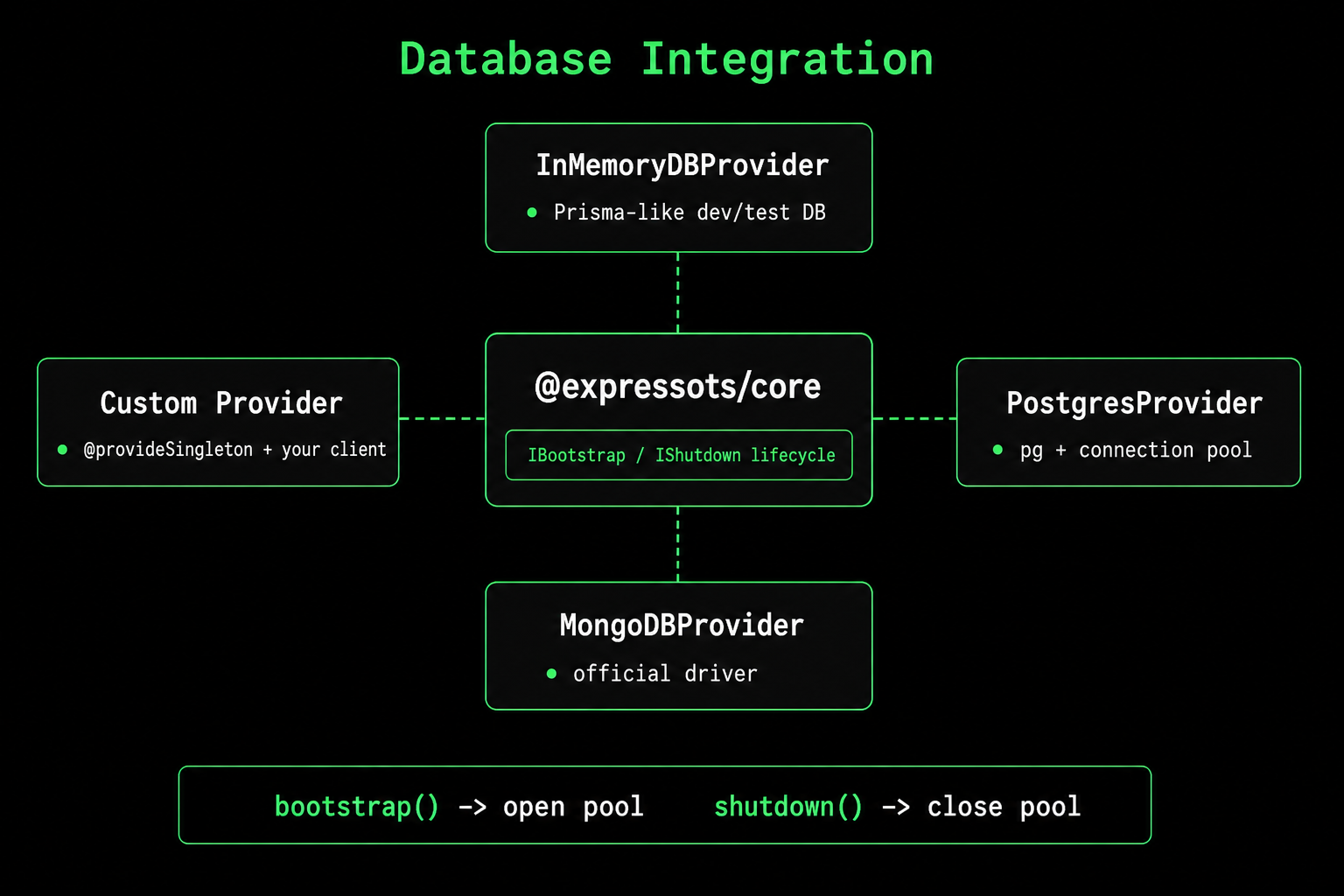
Pattern at a glance
| Step | Where it lives |
|---|---|
| Open the connection | bootstrap() on a singleton provider |
| Close the connection | shutdown() on the same provider |
| Read and write data | A thin repository that injects the provider |
| Test against a real DB shape | InMemoryDBProvider swapped in by environment |
InMemoryDBProvider: dev and test out of the box
InMemoryDBProvider ships in @expressots/core. It exposes a Prisma-shaped API (create, findMany, update, delete, relations, transactions) backed by an in-process store. Use it while you're prototyping, then switch to a real database without changing your repository signatures.
import { AppExpress } from "@expressots/adapter-express";
import { AppContainer, InMemoryDBProvider, Scope } from "@expressots/core";
import { AppModule } from "./app.module";

export class App extends AppExpress {
    private container: AppContainer = this.configContainer([AppModule]);

    protected configureServices(): void {
        this.Provider.register(InMemoryDBProvider, Scope.Singleton);
    }
}
import { inject, InMemoryDBProvider, provide } from "@expressots/core";

interface UserModel {
    id: string;
    email: string;
    name: string;
    createdAt: Date;
}

@provide(UserRepository)
export class UserRepository {
    constructor(@inject(InMemoryDBProvider) private readonly db: InMemoryDBProvider) {}

    private get users() {
        return this.db.table<UserModel>("users");
    }

    findByEmail(email: string) {
        return this.users.findUnique({ where: { email } });
    }

    create(input: { email: string; name: string }) {
        return this.users.create({ data: input });
    }

    list(limit = 100) {
        return this.users.findMany({ orderBy: { createdAt: "desc" }, take: limit });
    }
}
See In-Memory DB for the full query API, relations, transactions, and persistence options.
PostgreSQL: a real provider in 30 lines
The pattern is the same for any external store. Implement IBootstrap and IShutdown on a @provideSingleton class and the framework will open the pool when the app starts and close it when it shuts down.
npm install pg
npm install -D @types/pg
import { IBootstrap, IShutdown, Logger, provideSingleton } from "@expressots/core";
import { Pool, type PoolClient } from "pg";

@provideSingleton(PostgresProvider)
export class PostgresProvider implements IBootstrap, IShutdown {
    private pool!: Pool;
    private readonly logger = new Logger();

    async bootstrap(): Promise<void> {
        this.pool = new Pool({
            host: process.env.DB_HOST,
            port: Number(process.env.DB_PORT ?? 5432),
            database: process.env.DB_NAME,
            user: process.env.DB_USER,
            password: process.env.DB_PASSWORD,
            max: 20,
            idleTimeoutMillis: 30_000,
            connectionTimeoutMillis: 2_000,
        });

        await this.pool.query("SELECT 1");
        this.logger.info("Postgres pool ready", "PostgresProvider");
    }

    async shutdown(): Promise<void> {
        await this.pool.end();
        this.logger.info("Postgres pool closed", "PostgresProvider");
    }

    query<T>(sql: string, params?: Array<unknown>): Promise<Array<T>> {
        return this.pool.query<T extends object ? T : never>(sql, params).then((r) => r.rows);
    }

    async transaction<T>(fn: (client: PoolClient) => Promise<T>): Promise<T> {
        const client = await this.pool.connect();
        try {
            await client.query("BEGIN");
            const result = await fn(client);
            await client.query("COMMIT");
            return result;
        } catch (err) {
            await client.query("ROLLBACK");
            throw err;
        } finally {
            client.release();
        }
    }
}
Register it in configureServices the same way as the in-memory provider:
this.Provider.register(PostgresProvider, Scope.Singleton);
That's the whole integration. No special hooks, no decorators to memorize, no graceful-shutdown plumbing to write yourself.
Other drivers
The same IBootstrap + IShutdown shape covers every popular client. Two short examples:
- MongoDB
- Prisma
- TypeORM
import { IBootstrap, IShutdown, provideSingleton } from "@expressots/core";
import { MongoClient, type Db } from "mongodb";

@provideSingleton(MongoProvider)
export class MongoProvider implements IBootstrap, IShutdown {
    private client!: MongoClient;
    private database!: Db;

    async bootstrap(): Promise<void> {
        this.client = new MongoClient(process.env.MONGODB_URI!, {
            maxPoolSize: 10,
            minPoolSize: 2,
        });
        await this.client.connect();
        this.database = this.client.db(process.env.MONGODB_DB);
    }

    async shutdown(): Promise<void> {
        await this.client.close();
    }

    collection<T>(name: string) {
        return this.database.collection<T>(name);
    }
}
import { IBootstrap, IShutdown, provideSingleton } from "@expressots/core";
import { PrismaClient } from "@prisma/client";

@provideSingleton(PrismaProvider)
export class PrismaProvider extends PrismaClient implements IBootstrap, IShutdown {
    bootstrap() {
        return this.$connect();
    }

    shutdown() {
        return this.$disconnect();
    }
}
Inject PrismaProvider and call any model directly: this.prisma.user.findMany(...).
import { IBootstrap, IShutdown, provideSingleton } from "@expressots/core";
import { DataSource } from "typeorm";

@provideSingleton(TypeOrmProvider)
export class TypeOrmProvider implements IBootstrap, IShutdown {
    readonly dataSource = new DataSource({
        type: "postgres",
        url: process.env.DATABASE_URL,
        entities: ["src/**/*.entity.ts"],
        synchronize: process.env.NODE_ENV === "development",
    });

    bootstrap() {
        return this.dataSource.initialize();
    }

    shutdown() {
        return this.dataSource.destroy();
    }
}
Health checks
Implement IHealthCheck on your provider and it shows up automatically in /health (see Health Monitoring).
import type { HealthCheckResult, IHealthCheck } from "@expressots/core";

@provideSingleton(PostgresProvider)
export class PostgresProvider implements IBootstrap, IShutdown, IHealthCheck {
    // ...bootstrap / shutdown...

    async healthCheck(): Promise<HealthCheckResult> {
        const start = Date.now();
        try {
            await this.pool.query("SELECT 1");
            return { status: "healthy", latency: Date.now() - start };
        } catch (err) {
            return { status: "unhealthy", message: (err as Error).message };
        }
    }
}
Environment configuration
Keep credentials out of code. The framework's envFileConfig (see Configuration) loads the right .env.<environment> for you.
DB_HOST=localhost
DB_PORT=5432
DB_NAME=expressots_dev
DB_USER=postgres
DB_PASSWORD=devpassword
DB_HOST=prod-host
DB_PORT=5432
DB_NAME=expressots
DB_USER=app
DB_PASSWORD=${SECRET_FROM_VAULT}
Best practices
| Practice | Why |
|---|---|
Always implement both IBootstrap and IShutdown | Stops connection leaks on graceful shutdown. |
Register the provider as Singleton | One pool per app, not one per request. |
| Pool size matches your concurrency target | An idle pool that's too large wastes connections; one that's too small queues requests. |
| Parameterize queries | Prevents SQL injection. |
| Use transactions for multi-step writes | Atomicity is opt-in, not free. |
Implement IHealthCheck | Container orchestrators rely on it for readiness gates. |
Use InMemoryDBProvider in tests | Real database semantics with zero infrastructure. |
See also
- In-Memory DB: full Prisma-compatible API.
- Providers: scopes, registration, lifecycle.
- Health Monitoring:
IHealthCheckin the request flow. - Configuration: environment loading.
Support the Project
ExpressoTS is MIT-licensed open source. See the support guide to contribute.