Authentication
This guide walks you from a fresh ExpressoTS v4 project to a working JWT authentication flow using the framework's AuthProvider contract, Principal model, and convenience guards.
The framework owns the request lifecycle (verifying the request, extracting the principal, evaluating guards). Your code owns the policy (how to verify a token, what a user looks like, who can do what).
- Example repo: 02-jwt-authentication · 03-authorization-rbac
- All examples: Example projects
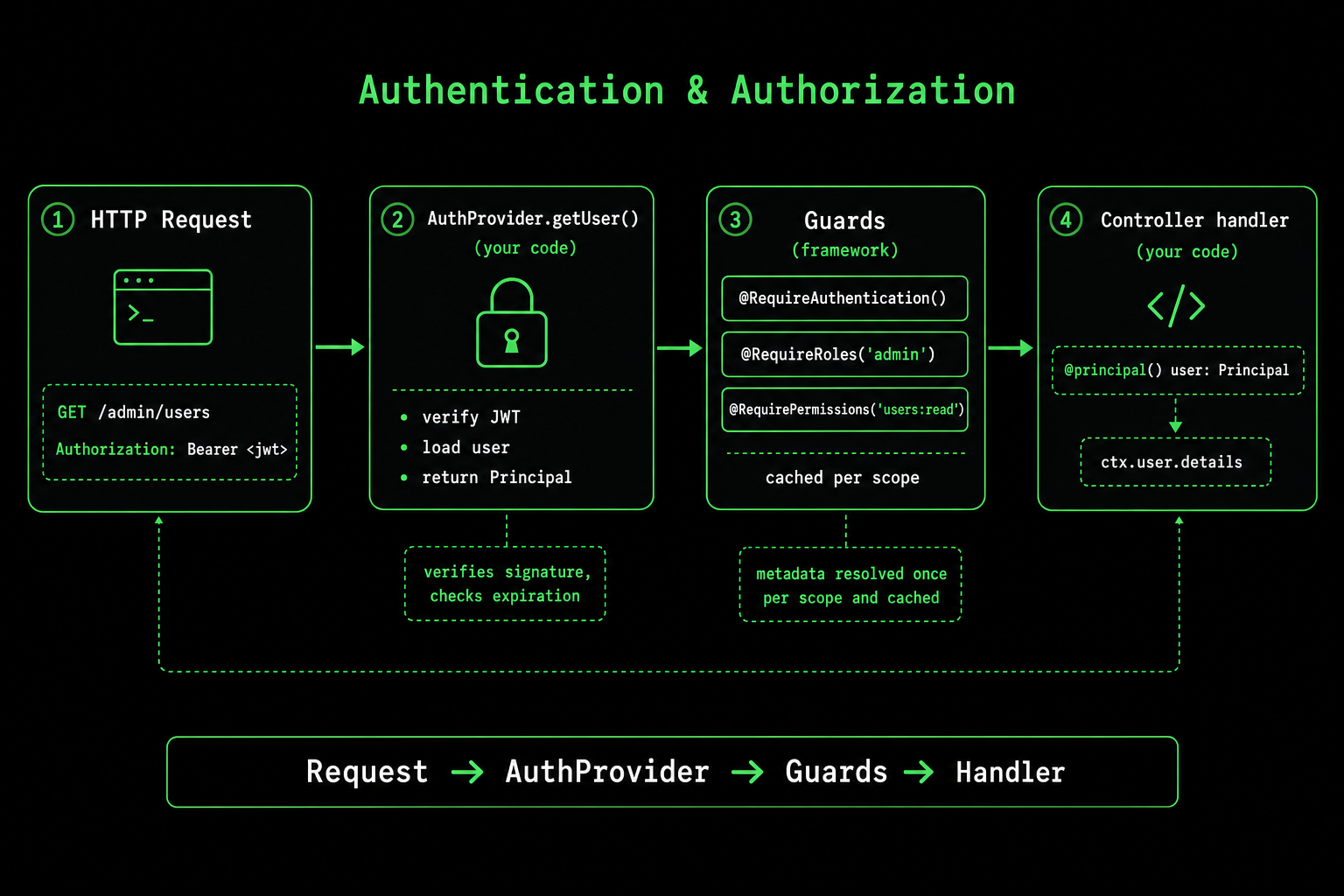
How the pieces fit
| Piece | Owner | Responsibility |
|---|---|---|
AuthProvider.getUser() | Your code | Read the request, verify the credential, return a Principal. |
Principal | Your code | Holds user details and answers isAuthenticated, isInRole, isResourceOwner. |
@RequireAuthentication, @RequireRoles, @RequirePermissions, @RequireOwnership | Framework | Declarative guards on controllers and methods. |
setupAuthorizationForExpress(...) | Framework | Binds your provider, wires preloading, and enables guard caching. |
@principal() | Framework | Injects the resolved Principal into your handler. |
The two pages that go deeper on each side are Guards and Authorization. This guide is the end-to-end recipe.
Step 1: Install dependencies
npm install jsonwebtoken bcryptjs
npm install -D @types/jsonwebtoken @types/bcryptjs
Step 2: Define your Principal
A Principal<T> is the framework's view of "who is making this request". Its three async methods are what guards call.
import { Principal } from "@expressots/core";

export interface UserDetails {
    id: string;
    email: string;
    roles: Array<string>;
    permissions: Array<string>;
}

export class AppPrincipal implements Principal<UserDetails> {
    constructor(public details: UserDetails) {}

    async isAuthenticated(): Promise<boolean> {
        return Boolean(this.details?.id);
    }

    async isInRole(role: string): Promise<boolean> {
        return this.details.roles.includes(role);
    }

    async isResourceOwner(resourceId: unknown): Promise<boolean> {
        return resourceId === this.details.id;
    }
}
isResourceOwner is what @RequireOwnership calls. Keep the logic simple here; you can layer real resource lookups in your use case if needed.
Step 3: Implement the AuthProvider
AuthProvider is a single-method interface from @expressots/adapter-express. Verify the credential and return a Principal. If the request is anonymous, return a principal whose isAuthenticated() resolves to false; never throw from here unless the credential is malformed.
import type { AuthProvider } from "@expressots/adapter-express";
import { provide } from "@expressots/core";
import type { NextFunction, Request, Response } from "express";
import * as jwt from "jsonwebtoken";
import { AppPrincipal, UserDetails } from "./app-principal";

const ANONYMOUS = new AppPrincipal({
    id: "",
    email: "",
    roles: [],
    permissions: [],
});

@provide(JwtAuthProvider)
export class JwtAuthProvider implements AuthProvider {
    private readonly secret = process.env.JWT_SECRET ?? "change-me";

    async getUser(req: Request, _res: Response, _next: NextFunction) {
        const header = req.headers.authorization;
        if (!header?.startsWith("Bearer ")) {
            return ANONYMOUS;
        }

        try {
            const payload = jwt.verify(header.slice(7), this.secret) as UserDetails;
            return new AppPrincipal(payload);
        } catch {
            return ANONYMOUS;
        }
    }
}
JWT_SECRET must come from a secret store in production. The default literal above is a developer convenience only.
Step 4: Wire it in App
Call setupAuthorizationForExpress from configureServices. The third argument is your Middleware instance (needed only when you enable preloading); the fourth is your AuthProvider class.
import { AppExpress } from "@expressots/adapter-express";
import { setupAuthorizationForExpress } from "@expressots/adapter-express";
import { AppContainer } from "@expressots/core";
import { AppModule } from "./app.module";
import { JwtAuthProvider } from "./auth/jwt-auth.provider";

export class App extends AppExpress {
    private container: AppContainer = this.configContainer([AppModule]);

    protected configureServices(): void {
        setupAuthorizationForExpress(
            this.container.Container,
            {
                enablePreloading: true,
                enableCaching: true,
                permissionHierarchy: {
                    admin: ["moderator", "user"],
                    moderator: ["user"],
                },
            },
            this.Middleware,
            JwtAuthProvider,
        );
    }
}
What that gives you for free:
- Preloading: the provider runs once per request, before guards. No accidental double verification.
- Caching: guard results are memoized within the request scope.
- Permission hierarchy: granting
adminautomatically satisfiesmoderatoranduserchecks.
Step 5: Protect routes with guards
Compose the four convenience decorators on controllers or methods. The framework resolves them in order and short-circuits on the first failure.
- Require authentication
- Require roles
- Require permissions
- Require ownership
import { controller, Get, principal } from "@expressots/adapter-express";
import { RequireAuthentication } from "@expressots/core";
import { AppPrincipal } from "../auth/app-principal";

@controller("/users")
export class UserController {
    @Get("/me")
    @RequireAuthentication()
    me(@principal() user: AppPrincipal) {
        return user.details;
    }
}
@controller("/admin")
@RequireRoles("admin")
export class AdminController {
    @Get("/users")
    listUsers() {
        // Only users with role "admin" reach this handler.
    }
}
@Get("/documents")
@RequirePermissions("documents:read")
list() {
    // Allows anyone whose Principal grants "documents:read".
}
@Delete("/:id")
@RequireAuthentication()
@RequireOwnership("id")
delete(@param("id") id: string) {
    // Reachable only if Principal.isResourceOwner(id) resolves true.
}
Step 6: Issue tokens
The framework does not ship a login controller. You write the one your app needs. The pattern below covers register, login, and refresh.
import { controller, Post, body } from "@expressots/adapter-express";
import { provide, inject } from "@expressots/core";
import * as bcrypt from "bcryptjs";
import * as jwt from "jsonwebtoken";
import { UserRepository } from "../users/user.repository";

interface Credentials {
    email: string;
    password: string;
}

@provide(AuthController)
@controller("/auth")
export class AuthController {
    private readonly secret = process.env.JWT_SECRET ?? "change-me";

    constructor(@inject(UserRepository) private readonly users: UserRepository) {}

    @Post("/login")
    async login(@body() dto: Credentials) {
        const user = await this.users.findByEmail(dto.email);
        if (!user || !(await bcrypt.compare(dto.password, user.passwordHash))) {
            return { error: "Invalid credentials" };
        }

        const accessToken = jwt.sign(
            { id: user.id, email: user.email, roles: user.roles, permissions: user.permissions },
            this.secret,
            { expiresIn: "15m" },
        );

        const refreshToken = jwt.sign({ id: user.id }, this.secret, { expiresIn: "7d" });

        return { accessToken, refreshToken };
    }
}
Step 7: Test it
createTestApp boots the real app, real DI container, and a fluent request builder. You can exercise the full auth pipeline without mocking JWT.
import { createTestApp } from "@expressots/core";
import { App } from "../src/app";
import { signTestToken } from "./helpers";

describe("Authentication", () => {
    let testApp: Awaited<ReturnType<typeof createTestApp>>;

    beforeAll(async () => {
        testApp = await createTestApp(App);
    });

    afterAll(async () => {
        await testApp.app.close();
    });

    it("rejects unauthenticated requests", async () => {
        await testApp.request
            .get("/users/me")
            .expectStatus(401);
    });

    it("accepts a valid bearer token", async () => {
        const token = signTestToken({ id: "u1", roles: ["user"] });

        await testApp.request
            .get("/users/me")
            .set("Authorization", `Bearer ${token}`)
            .expectStatus(200)
            .expectBodyPath("id", "u1");
    });
});
See Testing for the full surface (createTestApp, fluent assertions, smart mocks, load testing).
Security checklist
| Practice | Why it matters |
|---|---|
Load JWT_SECRET from a secret store | Hardcoded secrets leak via VCS. |
| Use short access-token lifetimes (15 min) | Limits the blast radius of a leaked token. |
| Rotate refresh tokens on use | Detects reuse and locks out stolen tokens. |
| Hash passwords with bcrypt cost 10+ | Slows offline attacks. |
Rate-limit /auth/login | Prevents credential stuffing. |
Use permissionHierarchy in setupAuthorizationForExpress | Avoids hand-maintained role tables. |
| Terminate TLS at the edge | Bearer tokens are useless if they ride plaintext. |
See also
- Guards: the full guard surface, including
UseGuardscomposition. - Authorization: ABAC, permission hierarchy, guard caching.
- Testing:
createTestServerand the full test toolkit.
Support the Project
ExpressoTS is MIT-licensed open source. See the support guide to contribute.