Micro API
Micro API is a radically simplified template for building microservices with minimal boilerplate. Inspired by modern frameworks like Hono and Elysia, it focuses on pure simplicity while giving you access to the rest of @expressots/adapter-express when you need it.
- Example: 13-micro-api
- All 15 projects: Example projects
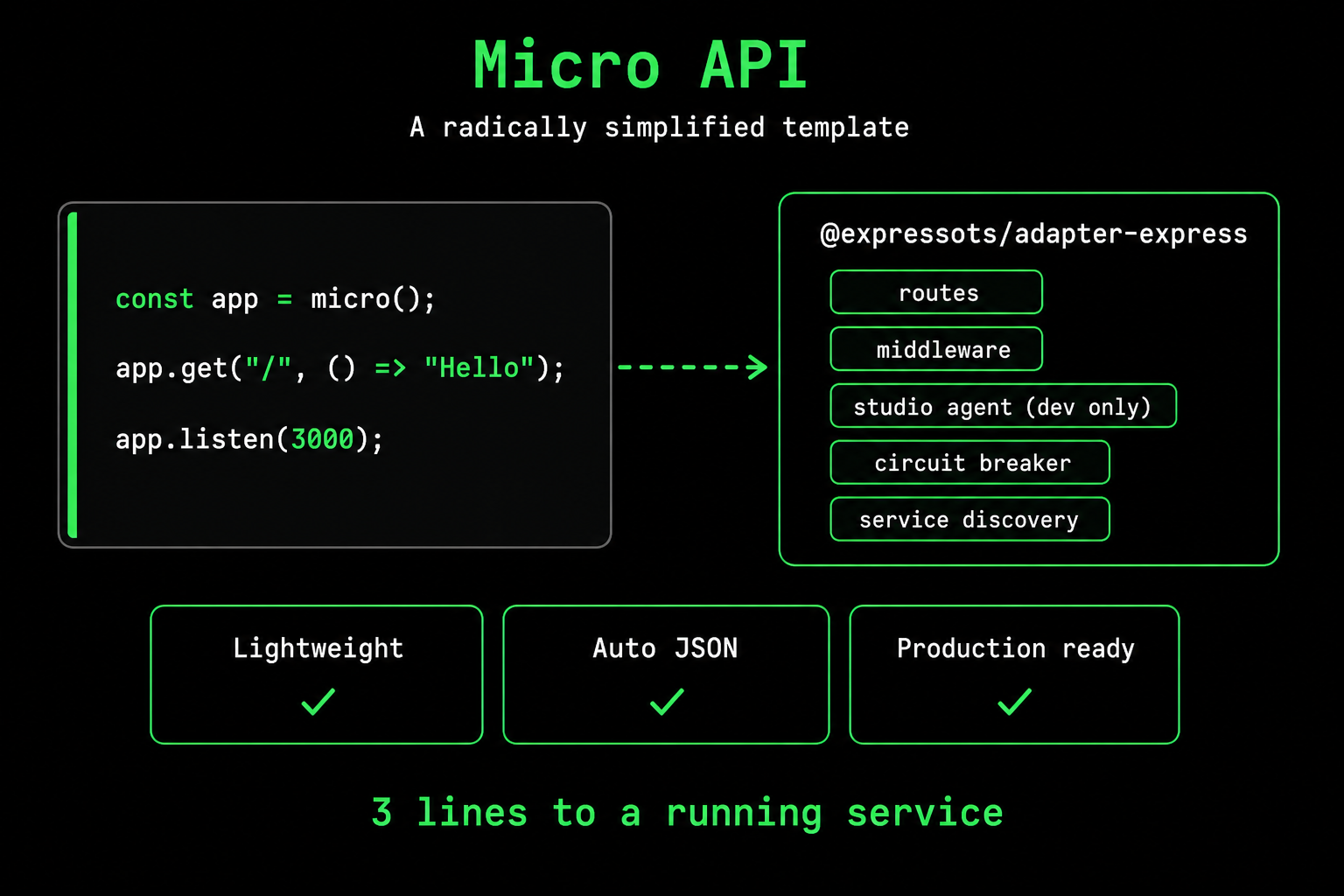
What you get
| Feature | Default |
|---|---|
| Three-line startup | micro(), app.get(...), app.listen(...) |
| Auto-response | Return a string, object, or array; the framework calls res.send / res.json for you |
| Auto JSON parsing | On by default |
| Express middleware | Drop in any RequestHandler |
| Studio Agent | Auto-enabled in development when the package is installed |
| Opt-in service mesh | CircuitBreaker, ServiceClient, ServiceDiscovery, ServiceProxy (separate imports) |
Getting Started
Create a New Micro API Project
expressots new my-api --template micro
Minimal Example
import { micro } from "@expressots/adapter-express";

const app = micro();

app.get("/", () => "Hello World");

app.listen(3000);
That's it! Three lines to a working API.
Project Structure
my-api/
├── src/
│   └── api.ts              # Main entry point
├── test/
│   └── api.spec.ts
├── Dockerfile
├── docker-compose.yml
├── package.json
├── tsconfig.json
└── expressots.config.ts
Basic Usage
The entire application is defined in a single file:
// src/api.ts
import { micro } from "@expressots/adapter-express";

const app = micro();

// Return objects - automatically JSON serialized
app.get("/", () => ({
    name: "ExpressoTS Micro",
    version: "4.0.0",
    message: "Hello from ExpressoTS Micro API!",
}));

// Return strings - sent as text
app.get("/text", () => "Hello World");

// Health check
app.get("/health", () => ({
    status: "healthy",
    timestamp: new Date().toISOString(),
    uptime: process.uptime(),
}));

// Start server
app.listen(3000);
Configuration
The micro() function accepts an optional configuration object:
const app = micro({
    autoParseJson: true,    // Enable JSON parsing (default: true)
    globalPrefix: "/api",   // Prefix all routes with /api
    showBanner: true,       // Show startup banner (default: true)
});
Route Definition
HTTP Methods
app.get("/path", handler);
app.post("/path", handler);
app.put("/path", handler);
app.patch("/path", handler);
app.delete("/path", handler);
Route Parameters
app.get("/users/:id", (req) => {
    return { id: req.params.id, name: "User " + req.params.id };
});

app.get("/posts/:postId/comments/:commentId", (req) => {
    const { postId, commentId } = req.params;
    return { postId, commentId };
});
Query Parameters
app.get("/search", (req) => {
    const { q, page, limit } = req.query;
    return {
        query: q,
        page: Number(page) || 1,
        limit: Number(limit) || 10,
    };
});
Request Body
app.post("/users", (req) => {
    const { name, email } = req.body;
    return {
        id: Date.now(),
        name,
        email,
        createdAt: new Date().toISOString(),
    };
});
Middleware
Express-Style Middleware
Middleware comes before the handler (Express convention):
// Single middleware
const logRequest = (req, res, next) => {
    console.log(`${req.method} ${req.url}`);
    next();
};

app.get("/", logRequest, () => "Hello World");

// Multiple middleware
const authenticate = (req, res, next) => {
    if (!req.headers.authorization) {
        return res.status(401).json({ error: "Unauthorized" });
    }
    next();
};

const validate = (req, res, next) => {
    // validation logic
    next();
};

app.post("/users", authenticate, validate, (req) => {
    return { id: Date.now(), ...req.body };
});
Global Middleware
// Apply to all routes
app.use((req, res, next) => {
    console.log(`${new Date().toISOString()} - ${req.method} ${req.url}`);
    next();
});

// Apply to specific path prefix
app.use("/api", authenticate);
Error Handler
app.setErrorHandler((err, req, res, next) => {
    console.error(err);
    res.status(500).json({
        error: err.message,
        timestamp: new Date().toISOString(),
    });
});

// Errors thrown in handlers are caught automatically
app.get("/error", () => {
    throw new Error("Something went wrong");
});
Auto-Response
Handlers can return values directly - no need to call res.json() or res.send():
// String returns → res.send()
app.get("/text", () => "Hello World");

// Object/Array returns → res.json()
app.get("/json", () => ({ message: "Hello" }));
app.get("/array", () => [1, 2, 3]);

// Async handlers work too
app.get("/async", async () => {
    const data = await fetchData();
    return data;
});

// Still works with traditional Express style if needed
app.get("/traditional", (req, res) => {
    res.status(201).json({ created: true });
});
Advanced Features
Advanced features are imported separately - use only what you need:
import {
    micro,
    CircuitBreaker,
    ServiceClient,
    ServiceDiscovery
} from "@expressots/adapter-express";
Circuit Breaker
Protect against cascading failures:
import { micro, CircuitBreaker } from "@expressots/adapter-express";

const app = micro();
const cb = new CircuitBreaker({
    failureThreshold: 5,    // Open after 5 failures
    successThreshold: 2,    // Close after 2 successes in half-open
    timeout: 60000,         // Reset timeout (60s)
});

app.get("/external-api", async () => {
    return await cb.execute(async () => {
        const response = await fetch("https://external-api.com/data");
        return response.json();
    });
});

// Circuit status endpoint
app.get("/circuit/status", () => cb.getStats());
Service Discovery
import { micro, ServiceDiscovery, ServiceClient } from "@expressots/adapter-express";

const app = micro();

// Initialize discovery
const discovery = new ServiceDiscovery({ type: "static" });

// Register services
discovery.registerService({
    id: "user-service-1",
    name: "user-service",
    host: "localhost",
    port: 3001,
    health: "healthy",
    lastCheck: new Date(),
});

discovery.registerService({
    id: "user-service-2",
    name: "user-service",
    host: "localhost",
    port: 3002,
    health: "healthy",
    lastCheck: new Date(),
});

// Get a healthy instance (round-robin load balancing)
app.get("/users/:id", async (req) => {
    const instance = discovery.getService("user-service");
    if (!instance) {
        throw new Error("user-service unavailable");
    }

    const client = new ServiceClient({
        name: "user-service",
        baseUrl: `http://${instance.host}:${instance.port}`,
        timeout: 5000,
    });

    return await client.get(`/users/${req.params.id}`);
});

app.listen(3000);
Service Client
Make HTTP requests to other services:
import { micro, ServiceClient } from "@expressots/adapter-express";

const app = micro();

const userClient = new ServiceClient({
    name: "user-service",
    baseUrl: "http://localhost:3001",
    timeout: 5000,
    retries: 3,
    circuitBreaker: {
        failureThreshold: 5,
        timeout: 60000,
    },
});

app.get("/users", async () => {
    return await userClient.get("/api/users");
});

app.get("/users/:id", async (req) => {
    return await userClient.get(`/api/users/${req.params.id}`);
});

app.post("/users", async (req) => {
    return await userClient.post("/api/users", req.body);
});

app.listen(3000);
Health Checks (Kubernetes Ready)
app.get("/health", () => ({
    status: "healthy",
    timestamp: new Date().toISOString(),
    uptime: process.uptime(),
}));

// Kubernetes readiness probe
app.get("/health/ready", async () => {
    const dbConnected = await checkDatabaseConnection();
    if (!dbConnected) {
        throw new Error("Database not ready");
    }
    return { status: "ready", timestamp: new Date().toISOString() };
});

// Kubernetes liveness probe
app.get("/health/live", () => ({
    status: "alive",
    timestamp: new Date().toISOString(),
}));
Serverless Deployment
AWS Lambda
import { micro, awsLambdaAdapter } from "@expressots/adapter-express";

const app = micro();

app.get("/", () => ({ message: "Hello Lambda!" }));

// Export Lambda handler
export const handler = awsLambdaAdapter(app);
serverless.yml:
service: my-micro-service
provider:
    name: aws
    runtime: nodejs20.x

functions:
    api:
        handler: dist/api.handler
        events:
            - httpApi: "*"
Body, base64, and binary content types
The Lambda adapter handles request and response bodies according to API Gateway / ALB / Function URL conventions:
| Direction | Behaviour |
|---|---|
| Incoming body | If event.isBase64Encoded is true, the body is decoded with Buffer.from(body, "base64") first. When Content-Type includes application/json, the body is then JSON.parse()d (with a fallback to the raw value if parsing fails). Other types pass through as a string or Buffer. |
| Outgoing body (text) | Strings come back as UTF-8 with isBase64Encoded: false. app.get(...) => "<h1>...</h1>" returns text/html; => { ... } returns application/json via the response helper. |
| Outgoing body (binary) | If the Content-Type matches one of config.binaryContentTypes, the body is base64-encoded and isBase64Encoded: true is set. Wildcards like image/* are supported. |
Configure the binary types the adapter should encode:
export const handler = awsLambdaAdapter(app, {
  binaryContentTypes: [
    "application/octet-stream",
    "application/pdf",
    "image/*",
    "video/*",
    "audio/*",
  ],
});
Make sure your API Gateway or Function URL configuration also lists these types as binary media types, otherwise the gateway will mangle the response.
Lambda-only fields
Each request handler receives the original Lambda event and context attached to req:
import type { LambdaEvent, LambdaContext } from "@expressots/adapter-express";

app.get("/", (req, res) => {
  const { event, context } = req.lambda as { event: LambdaEvent; context: LambdaContext };
  res.set("x-lambda-request-id", context.awsRequestId);
  return { region: process.env.AWS_REGION, requestId: context.awsRequestId };
});
The adapter also injects two request headers automatically:
x-lambda-request-id:context.awsRequestId.x-lambda-function:context.functionName.
Cold start tips
| Tip | Why |
|---|---|
Build a single bundle (esbuild / tsup) and ship it as the function handler. | Saves ~80–150 ms of Node require() walking through node_modules. |
Use micro() rather than the full AppExpress. | Skips DI container initialization. Bring DI back only if you need it. |
Prefer Lambda extensions for log shipping rather than HttpTransport. | Avoids blocking the response on log network I/O. |
Set binaryContentTypes precisely. | The fewer wildcards, the faster the per-request content-type lookup. |
Vercel
import { micro, vercelAdapter } from "@expressots/adapter-express";

const app = micro();

app.get("/api", () => ({ message: "Hello Vercel!" }));

export default vercelAdapter(app);
Cloudflare Workers
Scaffold a Worker project directly:
expressots new edge-api --template micro --package-manager pnpm --target cloudflare
That produces wrangler.toml, Wrangler-based scripts, and this entrypoint:
import { micro, cloudflareAdapter } from "@expressots/adapter-express";

const app = micro({
    showBanner: false,
    studio: { enabled: false },
});

app.get("/", () => ({ message: "Hello Workers!" }));

export default cloudflareAdapter(app);
wrangler.toml:
name = "edge-api"
main = "src/api.ts"
compatibility_date = "2026-07-29"
compatibility_flags = ["nodejs_compat"]
nodejs_compat is required — the adapter runs Express, which reaches for Node built-ins. The compatibility_date is pinned by the CLI and bumped per release.
The generated scripts are Wrangler's, not the ExpressoTS CLI's. Workers has no HTTP port to bind, so ex dev does not apply and @expressots/cli is not installed in the project:
| Script | Runs |
|---|---|
dev | wrangler dev — local Workers runtime (workerd), with bindings |
build | wrangler deploy --dry-run — validates the bundle without deploying |
deploy | wrangler deploy |
types | wrangler types — regenerates worker-configuration.d.ts |
test | vitest run — the suite runs inside workerd |
Testing
The Cloudflare scaffold uses @cloudflare/vitest-pool-workers rather than Jest, and SELF.fetch() dispatches through the real Worker:
import { SELF } from "cloudflare:test";
import { describe, expect, it } from "vitest";

describe("Cloudflare Worker", () => {
    it("returns the welcome message on GET /", async () => {
        const response = await SELF.fetch("https://example.com/");

        expect(response.status).toBe(200);
    });
});
Testing Worker code under Node is wrong in both directions, which is why the target does not simply keep Jest: undici omits content-length, so Express body middleware short-circuits and a Worker that fails every request in production goes green — and undici rejects a 204 response body that workerd accepts, so a correct endpoint fails its own suite.
Request bodies
The adapter reads and parses the body itself, before Express sees it, dispatching on Content-Type:
| Content-Type | req.body |
|---|---|
application/json, application/*+json | Parsed object. Malformed JSON returns 400 {"error":"Bad Request"} without reaching your handler. |
application/x-www-form-urlencoded | Object parsed with qs — the same parser express.urlencoded({ extended: true }) uses, so a=1&a=2, n[]=x and u[name]=jo produce the shapes they do on Node. |
multipart/form-data | Object parsed with the runtime's native FormData. File parts become { filename, contentType, size, data }, where data is a Buffer with the bytes intact. |
text/*, or no Content-Type | The raw string. |
Anything else (application/octet-stream, images, …) | A Buffer. Binary is never UTF-8 decoded, so uploads survive byte for byte. |
No body, or GET / HEAD | undefined |
Query strings go through qs too, so ?tag=a&tag=b is { tag: ["a", "b"] } rather than the last value winning.
Bodies larger than 1 MiB are rejected with 413 before being read. A Workers isolate has 128 MB of memory and Cloudflare accepts bodies up to 100 MB, so an unbounded read is an availability hazard. Adjust or disable it:
export default cloudflareAdapter(app, {
    maxBodySize: 5 * 1024 * 1024, // 5 MiB; 0 disables the limit
});
The adapter hands Express a mock request object rather than a Readable stream, so anything that reads the body as a stream fails: express.json(), express.urlencoded(), express.text(), express.raw(), multer(), compression().
micro()'s built-in parsers stand down automatically when a serverless adapter is attached, so the default micro() config works unchanged. Registering one of these explicitly throws at wrangler dev startup rather than returning 500 on every request:
cloudflareAdapter: express.json() cannot be used on this runtime.
The adapter parses the request body and hands Express a mock request, not a
stream, so body-reading middleware fails on every request — including GET
requests with no body.
Read parsed data from req.body instead.
What behaves the same as Node
app.setErrorHandler() and the RFC-7807 404 body with route suggestions both apply on Workers: micro() finalizes its middleware stack on the first request rather than inside listen(), so how the app is hosted makes no difference. Multiple Set-Cookie headers, direct res.statusCode assignment, and empty-body statuses (204/205/304) all behave as they do on Node.
Platform constraints
Workers is not a small Node server — several of its limits change how you write the app. These are the ones that bite an ExpressoTS project, with what they mean here rather than in the abstract.
| Limit | Free | Paid | Why it matters for ExpressoTS |
|---|---|---|---|
| Startup time | 1 second | 1 second | The whole module scope must parse and execute in 1s — and on this target that is micro(), every app.get(...) registration, and cloudflareAdapter(). A scaffolded app uses a small fraction of it, but this is the budget that route registration and any top-level work draw down. Move expensive setup into a handler, or behind a lazy singleton. |
| Memory | 128 MB | 128 MB | Per isolate, shared by the JS heap and any WebAssembly. This is why the adapter caps buffered request bodies at 1 MiB by default: Cloudflare will accept a body far larger than the isolate can hold. |
| Worker size | 3 MB | 10 MB | Compressed. A minimal ExpressoTS Worker is around 537 KB gzipped, so there is headroom — but Express and its dependencies dominate that figure, and it grows with what you import. Check it with wrangler deploy --dry-run before adding heavy dependencies. |
| CPU time per request | 10 ms | 5 min (default 30 s) | Wall-clock time spent waiting on I/O does not count — only CPU. On the free plan, 10 ms is not much for JSON serialisation plus Express routing, so measure before assuming. |
| Request body | 100 MB | 100 MB–500 MB by plan | Cloudflare's cap, not the Worker's. The adapter's own maxBodySize (1 MiB) sits far below it deliberately; raising it toward the platform limit risks the 128 MB isolate. |
| Subrequests per request | 50 | 10,000 | Every outbound fetch() counts. Fan-out patterns that are fine on Node will hit this. |
| Environment variables | 64 | 128 | Declared in wrangler.toml, not .env. |
Two behavioural constraints have no number attached and catch people out more often than the limits do:
- No persistent globals. Module-scope state survives only for the life of an isolate, and you control neither when an isolate starts nor when it is discarded. Two requests may or may not share one. Anything you would have kept in a module-level
Map— sessions, counters, caches — needs KV, Durable Objects, or D1. A global that "works in testing" is an isolate being reused, not a guarantee. - No filesystem, no long-lived connections. There is no
fs, and connection pools cannot be held open between requests the way they are on Node.
Other limitations of this target
- Responses are buffered, not streamed — the adapter collects the whole body before returning it. Streaming is tracked in #947.
- No
.envfiles. Configuration comes fromwrangler.tomlvars and secrets, reached through the bindings on the request context (req.cloudflare.env). - The multipart file shape is provisional. File parts arrive as
{ filename, contentType, size, data }withdataaBuffer. A future fetch-native runtime (#947) may expose the platform's nativeFileinstead, so treat this shape as subject to change.
Docker Deployment
Dockerfile
FROM node:20-alpine AS builder
WORKDIR /app
COPY package*.json ./
RUN npm ci
COPY . .
RUN npm run build

FROM node:20-alpine
WORKDIR /app
RUN addgroup -g 1001 -S nodejs && adduser -S expressots -u 1001 -G nodejs
COPY --from=builder --chown=expressots:nodejs /app/node_modules ./node_modules
COPY --from=builder --chown=expressots:nodejs /app/dist ./dist
ENV NODE_ENV=production
USER expressots
EXPOSE 3000
HEALTHCHECK --interval=30s --timeout=3s CMD wget -q --spider http://localhost:3000/health || exit 1
CMD ["node", "dist/src/api.js"]
Docker Compose
version: "3.8"
services:
    app:
        build: .
        ports:
            - "3000:3000"
        environment:
            - NODE_ENV=production
            - PORT=3000
        healthcheck:
            test: ["CMD", "wget", "--spider", "-q", "http://localhost:3000/health"]
            interval: 30s
            timeout: 3s
Kubernetes Deployment
apiVersion: apps/v1
kind: Deployment
metadata:
    name: expressots-micro
spec:
    replicas: 3
    template:
        spec:
            containers:
                - name: app
                  image: expressots-micro:latest
                  ports:
                      - containerPort: 3000
                  livenessProbe:
                      httpGet:
                          path: /health/live
                          port: 3000
                      initialDelaySeconds: 30
                      periodSeconds: 10
                  readinessProbe:
                      httpGet:
                          path: /health/ready
                          port: 3000
                      initialDelaySeconds: 5
                      periodSeconds: 5
Testing
Using Native Fetch
import "reflect-metadata";
import { micro, MicroApp } from "@expressots/adapter-express";

describe("Micro API", () => {
    let app: MicroApp;
    let baseUrl: string;

    beforeAll(async () => {
        app = micro({ showBanner: false });

        app.get("/", () => ({ message: "Hello" }));
        app.get("/health", () => ({ status: "healthy" }));

        await app.listen(0);
        const port = (app.getHttpServer().address() as { port: number }).port;
        baseUrl = `http://localhost:${port}`;
    });

    afterAll(() => {
        app.getHttpServer().close();
    });

    it("should return message", async () => {
        const response = await fetch(`${baseUrl}/`);
        const json = await response.json();
        expect(json.message).toBe("Hello");
    });

    it("should return healthy status", async () => {
        const response = await fetch(`${baseUrl}/health`);
        const json = await response.json();
        expect(json.status).toBe("healthy");
    });
});
Using createFluentRequest
import "reflect-metadata";
import { micro, MicroApp } from "@expressots/adapter-express";
import { createFluentRequest } from "@expressots/core";

describe("Micro API", () => {
    let app: MicroApp;
    let baseUrl: string;

    beforeAll(async () => {
        app = micro({ showBanner: false });

        app.get("/health", () => ({ status: "healthy" }));

        await app.listen(0);
        const port = (app.getHttpServer().address() as { port: number }).port;
        baseUrl = `http://localhost:${port}`;
    });

    it("should return healthy status", async () => {
        const request = createFluentRequest(baseUrl);
        const response = await request
            .get("/health")
            .expectStatus(200)
            .execute();

        expect((response.body as { status: string }).status).toBe("healthy");
    });
});
API Reference
micro(config?)
Creates a new micro API instance.
interface MicroConfig {
    autoParseJson?: boolean;  // Default: true
    globalPrefix?: string;    // Default: ""
    showBanner?: boolean;     // Default: true
}
MicroApp Methods
| Method | Description |
|---|---|
get(path, ...middleware, handler) | Register GET route |
post(path, ...middleware, handler) | Register POST route |
put(path, ...middleware, handler) | Register PUT route |
patch(path, ...middleware, handler) | Register PATCH route |
delete(path, ...middleware, handler) | Register DELETE route |
use(...middleware) | Add global middleware |
use(path, ...middleware) | Add path-scoped middleware |
setErrorHandler(fn) | Set custom error handler |
listen(port, appInfo?) | Start the server |
getHttpServer() | Get HTTP server instance |
getApp() | Get underlying Express app |
When to Use Micro API
Use Micro API for:
- Quick prototypes and POCs
- Simple CRUD APIs
- Webhook handlers
- Serverless functions
- Microservices with few endpoints
- APIs that don't need DI
Use Full Template for:
- Complex business logic
- Multi-module applications
- Applications requiring dependency injection
- Projects with complex authorization
- Enterprise applications
Need Dependency Injection?
Micro API is designed for simplicity without DI. If you need dependency injection, decorators, and enterprise features, use the full ExpressoTS framework:
expressots new my-app --template application
Migrating from v3 createMicroAPI()
If you have legacy code using the v3-era createMicroAPI() API, here are the key changes for v4:
v3 (createMicroAPI) | v4 (micro) |
|---|---|
createMicroAPI() | micro() |
microAPI.build() | Not needed. micro() returns the app directly |
app.Middleware.parse() | Auto-enabled |
app.Route.get(path, handler, ...middleware) | app.get(path, ...middleware, handler) |
microAPI.Container.addSingleton() | Use the full framework (@expressots/core) for DI |
Quick migration example
v3 (legacy createMicroAPI):
import { createMicroAPI } from "@expressots/adapter-express";

const microAPI = createMicroAPI();
const app = microAPI.build();
app.Middleware.parse();
app.Route.get("/", (req, res) => {
    res.json({ message: "Hello" });
});
app.listen(3000);
v4 (current micro()):
import { micro } from "@expressots/adapter-express";

const app = micro();
app.get("/", () => ({ message: "Hello" }));
app.listen(3000);
createMicroAPI is removed in v4The legacy createMicroAPI() factory is not exported from @expressots/adapter-express v4. Use micro() instead.
Support the Project
ExpressoTS is MIT-licensed open source. See the support guide to contribute.