Dynamic Template System Architecture
Learn about the architecture behind ExpressoTS CLI's dynamic template and pricing system, designed to keep the CLI up-to-date without requiring constant releases.
The Problem We Solved
Traditional CLI Issue:
- Templates hardcoded in CLI source code
- Every template update requires new CLI release
- Users must update CLI to get latest templates
- Pricing data becomes stale quickly
- Community can't easily contribute
Our Solution:
- Templates stored in external GitHub repository
- CLI fetches templates on-demand
- Community can contribute via pull requests
- Pricing updates independent of CLI releases
- Offline support with embedded fallbacks
Architecture Overview
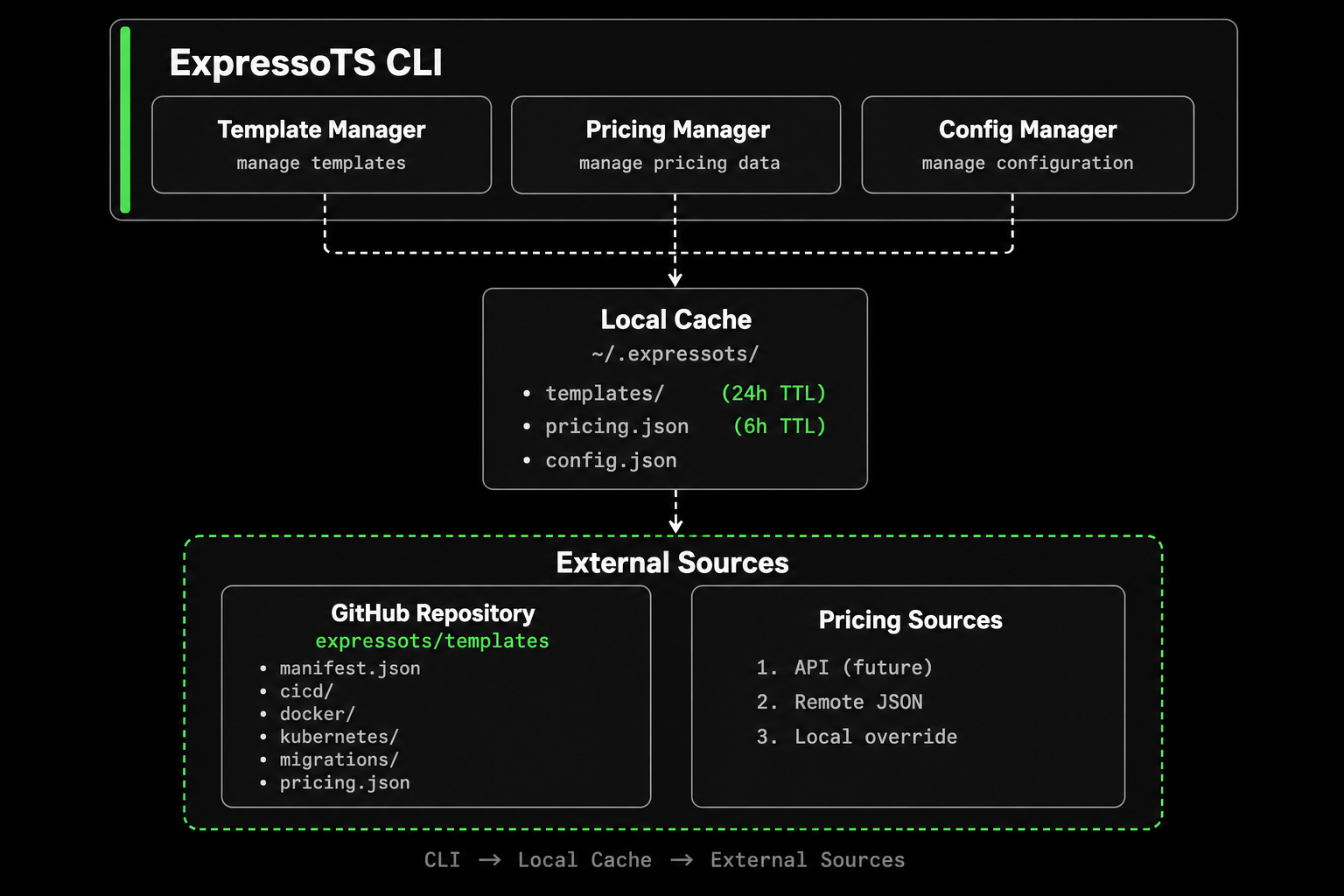
Component Details
1. Template Manager
Location: src/templates/manager.ts
Responsibilities:
- Fetch templates from GitHub
- Manage local cache
- Render templates with variables
- Handle offline mode
- Provide embedded fallbacks
Key Methods:
// Fetch CI/CD template
await manager.fetchCICDTemplate("github", "comprehensive");

// Render with variables
manager.render(template, { variables: {...}, conditionals: {...} });

// Update all cached templates
await manager.updateCache();
2. Template Cache
Location: src/templates/cache.ts
Storage: ~/.expressots/cache/templates/
Features:
- 24-hour TTL (configurable)
- Automatic expiration
- Statistics tracking
- Cross-platform paths
Cache Structure:
~/.expressots/
├── cache/
│   ├── templates/
│   │   ├── manifest-root.cache.json
│   │   ├── cicd-github-basic.cache.json
│   │   ├── docker-production.cache.json
│   │   └── ...
│   └── pricing.json
└── config.json
3. Template Fetcher
Location: src/templates/fetcher.ts
Features:
- HTTPS fetching from GitHub
- Retry logic with exponential backoff
- Timeout handling (5 seconds)
- Rate limit detection
- 404 handling
URL Pattern:
https://raw.githubusercontent.com/
  {repository}/      # e.g., expressots/templates
  {branch}/          # e.g., main
  {path}             # e.g., cicd/github/basic.yml
4. Template Renderer
Location: src/templates/renderer.ts
Syntax Support:
- Simple variables:
{{name}} - Conditionals:
{{#condition}}...{{/condition}} - Negative conditionals:
{{^condition}}...{{/condition}} - Loops:
{{#each items}}...{{/each}} - Nested variables:
{{app.version}}
Example:
name: {{projectName}}

{{#includeSecurity}}
security:
  scan: enabled
{{/includeSecurity}}
5. Pricing Manager
Location: src/costs/pricing-manager.ts
Features:
- Cascading source fallback
- 6-hour cache TTL
- Cost calculation engine
- Provider comparison
- Optimization recommendations
Data Sources:
- API Source (
sources/api-source.ts) - Future pricing API - Remote JSON (
sources/remote-json-source.ts) - GitHub-hosted - Local JSON (
sources/local-json-source.ts) - User override
6. Config Manager
Location: src/config/manager.ts
Storage: ~/.expressots/config.json
Configuration:
{
  "templates": {
    "repository": "expressots/templates",
    "branch": "main",
    "cacheTTL": 86400
  },
  "pricing": {
    "sources": ["api", "remote", "local"],
    "cacheTTL": 21600,
    "customFile": null
  },
  "offline": false
}
Data Flow
Template Generation Flow
User runs: expressots cicd generate github
                    ↓
            Template Manager
                    ↓
         Check memory cache? → Yes → Use cached
                    ↓ No
          Check disk cache? → Yes → Use cached
                    ↓ No
         Offline mode? → Yes → Use embedded
                    ↓ No
         Fetch from GitHub
                    ↓
    Successful? → Yes → Cache & use
                    ↓ No
           Use embedded fallback
                    ↓
        Render with variables
                    ↓
         Write to filesystem
Pricing Fetch Flow
User runs: expressots costs compare
                    ↓
            Pricing Manager
                    ↓
          Check cache (6h TTL)? → Valid → Use cached
                    ↓ No
         Try API source → Success → Cache & use
                    ↓ Failed
      Try Remote JSON → Success → Cache & use
                    ↓ Failed
      Try Local JSON → Success → Cache & use
                    ↓ Failed
           Return error
Performance Characteristics
Template Loading
Cold start (no cache):
- Remote fetch: 1-3 seconds
- Fallback to embedded: < 100ms
Warm start (cached):
- Disk read: < 50ms
- Memory cache: < 1ms
Pricing Loading
Cold start (no cache):
- API fetch: 500-1000ms (when available)
- Remote JSON: 1-2 seconds
- Local JSON: < 100ms
Warm start (cached):
- Memory: < 1ms
- Disk: < 50ms
Cache Optimization
- Template cache: 24-hour TTL balances freshness vs performance
- Pricing cache: 6-hour TTL keeps pricing current
- Manifest cache: Separate from individual templates
- Automatic cleanup: No manual maintenance needed
Extensibility
Adding New Template Categories
To add a new category (e.g., "serverless"):
- Update types (
src/templates/types.ts):
export type TemplateCategory =
  | "cicd"
  | "docker"
  | "kubernetes"
  | "migrations"
  | "serverless";  // Add new category
- Update fetcher (
src/templates/fetcher.ts):
case "serverless":
  templatePath = `serverless/${platform}/${variant}.yml`;
  break;
-
Update manifest schema in templates repository
-
Create generator (
src/serverless/generators/)
Adding New Variables
Variables are defined in template loaders:
// src/cicd/generators/template-loader.ts
const renderOptions: RenderOptions = {
  variables: {
    projectName: options.projectName,
    // Add new variable:
    customField: options.customField,
  },
};
Then use in templates:
custom: {{customField}}
Adding New Pricing Sources
Implement the PricingSource interface:
// src/costs/sources/new-source.ts
export class NewPricingSource implements PricingSource {
  name = "new-source";

  async fetch(): Promise<PricingData | null> {
    // Fetch implementation
  }
}
Register in PricingManager:
case "new-source":
  this.sources.push(new NewPricingSource());
  break;
Security Considerations
Template Security
- No code execution: Templates are text-only
- Variable validation: All inputs sanitized
- No external scripts: Templates don't download scripts
- Read-only fetching: Fetcher only reads, never writes to remote
Pricing Security
- Read-only access: Never writes to remote sources
- Local override safe: User controls local file
- No credentials: No API keys in public pricing data
- HTTPS only: All remote fetches use HTTPS
Cache Security
- User-scoped: Cache stored in user's home directory
- No sensitive data: Templates and pricing are public
- Automatic cleanup: Old caches expire automatically
- Configurable location: Can change via environment variables
Testing
Unit Tests
Template Renderer:
// test/templates/renderer.spec.ts
it("should substitute variables", () => {
  const result = renderer.render("Hello {{name}}", {
    variables: { name: "World" }
  });
  expect(result).toBe("Hello World");
});
Template Cache:
// test/templates/cache.spec.ts
it("should cache and retrieve templates", () => {
  cache.set("cicd", "github", data, "basic");
  const retrieved = cache.get("cicd", "github", "basic");
  expect(retrieved).toEqual(data);
});
Pricing Manager:
// test/pricing/pricing-manager.spec.ts
it("should validate pricing data", () => {
  const valid = manager.validatePricing(mockPricing);
  expect(valid).toBe(true);
});
Integration Tests
Test end-to-end template generation:
# Generate and verify output
expressots cicd generate github --strategy basic
test -f .github/workflows/ci.yml
Testing Custom Templates
# Point to test repository
expressots templates repo set test-org/test-templates

# Update cache
expressots templates update

# Generate and inspect
expressots cicd generate github
cat .github/workflows/ci.yml

# Reset
expressots templates repo reset
Monitoring & Observability
Debug Mode
Enable debug output:
export EXPRESSOTS_DEBUG=1
expressots cicd generate github
Shows:
- Template source (remote/embedded)
- Fetch timing
- Cache hits/misses
- Variable substitution
Status Commands
# Template system status
expressots templates status

# Shows:
# - Online/offline
# - Cache statistics
# - Last update time

# Pricing status
expressots costs info

# Shows:
# - Data version
# - Last update
# - Source used
# - Cache age
Migration from v3
If you're upgrading from ExpressoTS CLI v3:
No Breaking Changes
All existing commands work the same:
# These work exactly as before
expressots cicd generate github
expressots containerize docker
expressots migrate generate --from heroku --to railway
New Features Available
New commands added in v4:
# Template management (new in v4)
expressots templates list
expressots templates update

# Pricing management (new in v4)
expressots costs update
expressots costs info
Automatic Benefits
You automatically get:
- Latest CI/CD best practices
- Current pricing data
- Community-contributed improvements
- Security scanning templates
- Kubernetes deployment strategies
Migration Steps
-
Update CLI:
npm update -g @expressots/cli -
Fetch latest templates:
expressots templates update -
Update pricing data:
expressots costs update -
Verify status:
expressots templates statusexpressots costs info
That's it! You're now using the dynamic template system.
Best Practices
For Development Teams
-
Set up organization templates:
# One-time setupexpressots templates repo set mycompany/expressots-templates -
Add to onboarding docs:
New developers should run:- expressots templates repo set mycompany/templates- expressots templates update -
Keep templates updated:
# Monthly or on project startexpressots templates updateexpressots costs update -
Review generated files:
- Always inspect generated CI/CD before committing
- Test pipelines in CI environment
- Customize as needed
For Organizations
Create Organization Templates:
- Fork
expressots/templates - Customize for your needs:
- Add company Docker registry
- Include company-specific security scans
- Add deployment to internal infrastructure
- Maintain your fork
- Team uses:
expressots templates repo set mycompany/templates
Benefits:
- Standardized configurations across projects
- Company best practices codified
- Easier onboarding
- Compliance requirements met
For Open Source Projects
Public Templates:
Create public templates optimized for OSS:
# Example: Add CodeCov, npm publish steps
expressots templates repo set opensource-org/oss-templates
Share with community in README:
## Development

We use ExpressoTS with custom OSS templates:

\`\`\`bash
expressots templates repo set opensource-org/oss-templates
expressots cicd generate github
\`\`\`
Advanced Usage
Template Variables Deep Dive
Accessing nested data:
image: {{docker.registry}}/{{docker.image}}:{{version}}
Array iteration:
{{#each environments}}
  - name: {{.}}
    value: "{{@index}}"
{{/each}}
Conditional nesting:
{{#isProduction}}
  {{#includeSecurity}}
    security: maximum
  {{/includeSecurity}}
{{/isProduction}}
Custom Pricing Calculations
Override pricing logic for specific use cases:
{
  "providers": {
    "aws": {
      "serviceName": "ECS Fargate - Reserved",
      "cpuPerHour": 0.02424,
      "memoryPerGbHour": 0.002667,
      "notes": "1-year reserved instance pricing (40% discount)"
    }
  }
}
Environment-Specific Configurations
# Development config
export EXPRESSOTS_TEMPLATE_REPO=dev-templates/templates
expressots templates update

# Production config
export EXPRESSOTS_TEMPLATE_REPO=prod-templates/templates
expressots cicd generate github
Troubleshooting
Template Fetch Fails
Symptom: Timeout or connection errors
Solutions:
- Check internet connection
- Verify GitHub is accessible
- Use offline mode:
expressots --offline templates list - Check repository setting:
expressots templates status
Cache Issues
Symptom: Old templates still being used
Solutions:
# Clear cache
expressots templates clear

# Force update
expressots templates update

# Verify
expressots templates status
Custom Repository Not Working
Symptom: Templates not found from custom repo
Checklist:
- Repository format:
owner/repo(no URL prefix) - Branch exists (default:
main) - manifest.json valid JSON
- File structure matches manifest paths
- Repository is public (or authenticated)
Debug:
# Check current config
cat ~/.expressots/config.json

# Test connection
expressots templates status

# Reset and retry
expressots templates repo reset
expressots templates update
Performance Tuning
Faster Template Loading
# Pre-cache templates for offline work
expressots templates update

# Set longer TTL (48 hours)
# Edit ~/.expressots/config.json
{
  "templates": {
    "cacheTTL": 172800
  }
}
Reduce Network Calls
# Use embedded templates (no network)
expressots --offline cicd generate github

# Or set offline mode permanently
# Edit ~/.expressots/config.json
{
  "offline": true
}
Optimize CI/CD Usage
In CI environments, use embedded templates to avoid rate limits:
# .github/workflows/deploy.yml
- name: Generate CI files
  run: expressots --offline cicd generate github
FAQ
Q: Where are templates stored?
A: Three places:
- Remote: GitHub at
expressots/templates - Cache:
~/.expressots/cache/templates/(24h) - Embedded: Built into CLI binary
Q: How often should I update templates?
A:
- Manually: Once a month or when starting new projects
- Automatically: CLI updates cache after 24 hours
- CI/CD: Use
--offlineto avoid rate limits
Q: Can I use private template repositories?
A: Yes, but requires authentication:
# Use GitHub personal access token
export GITHUB_TOKEN=your_token
expressots templates repo set private-org/templates
Q: What happens if GitHub is down?
A: CLI automatically falls back to embedded templates. You'll see:
Source: (embedded fallback)
Q: How do I contribute a new cloud provider?
A: Two-step process:
- Add to
pricing.jsonin templates repo (no CLI changes needed) - Add type definition in CLI (
src/costs/types.ts) - requires CLI PR
Q: Can I mix remote and local templates?
A: Yes! Use remote for standard templates, override specific ones locally by setting custom repository or modifying cache files.
Q: Is there a size limit for templates?
A: No hard limit, but keep templates reasonable:
- CI/CD: < 500 lines
- Docker: < 200 lines
- Keep it maintainable
Q: How do I roll back to old template versions?
A:
# Use specific branch
expressots templates repo set expressots/templates v1.0.0

# Or tag
expressots templates repo set expressots/templates tags/v1.0.0
Related Documentation
- Templates & Customization - User guide
- Pricing Data Management - Cost estimation
- Contributing Guide - How to contribute
- CLI Overview - All CLI commands