Lazy Loading
Zero-config module loading with automatic route detection.
Overview
| Feature | Description |
|---|---|
| Zero-Config | Routes auto-detected from @controller() |
| One-Liner Setup | setupLazyLoadingForExpress() |
| Warmup Strategies | Idle, immediate, scheduled |
| Preload Hints | Low, medium, high, never |
| Performance Metrics | Built-in tracking |
| Auto Middleware | Loads middleware for lazy routes |
Quick Start
1. Create Lazy Modules
import { CreateLazyModule } from "@expressots/core";
import { ReportsController } from "./reports.controller";
import { AdminController } from "./admin.controller";

// Reports module - loads when /reports routes are accessed
export const ReportsLazyModule = CreateLazyModule(
    [ReportsController],
    { name: "ReportsModule" }
).withPreloadHint("low");

// Admin module - only loads when accessed
export const AdminLazyModule = CreateLazyModule(
    [AdminController],
    { name: "AdminModule" }
).withPreloadHint("never");
2. Setup Lazy Loading
import { setupLazyLoadingForExpress } from "@expressots/adapter-express";

export class App extends AppExpress {
    private config: AppContainer = this.configContainer([
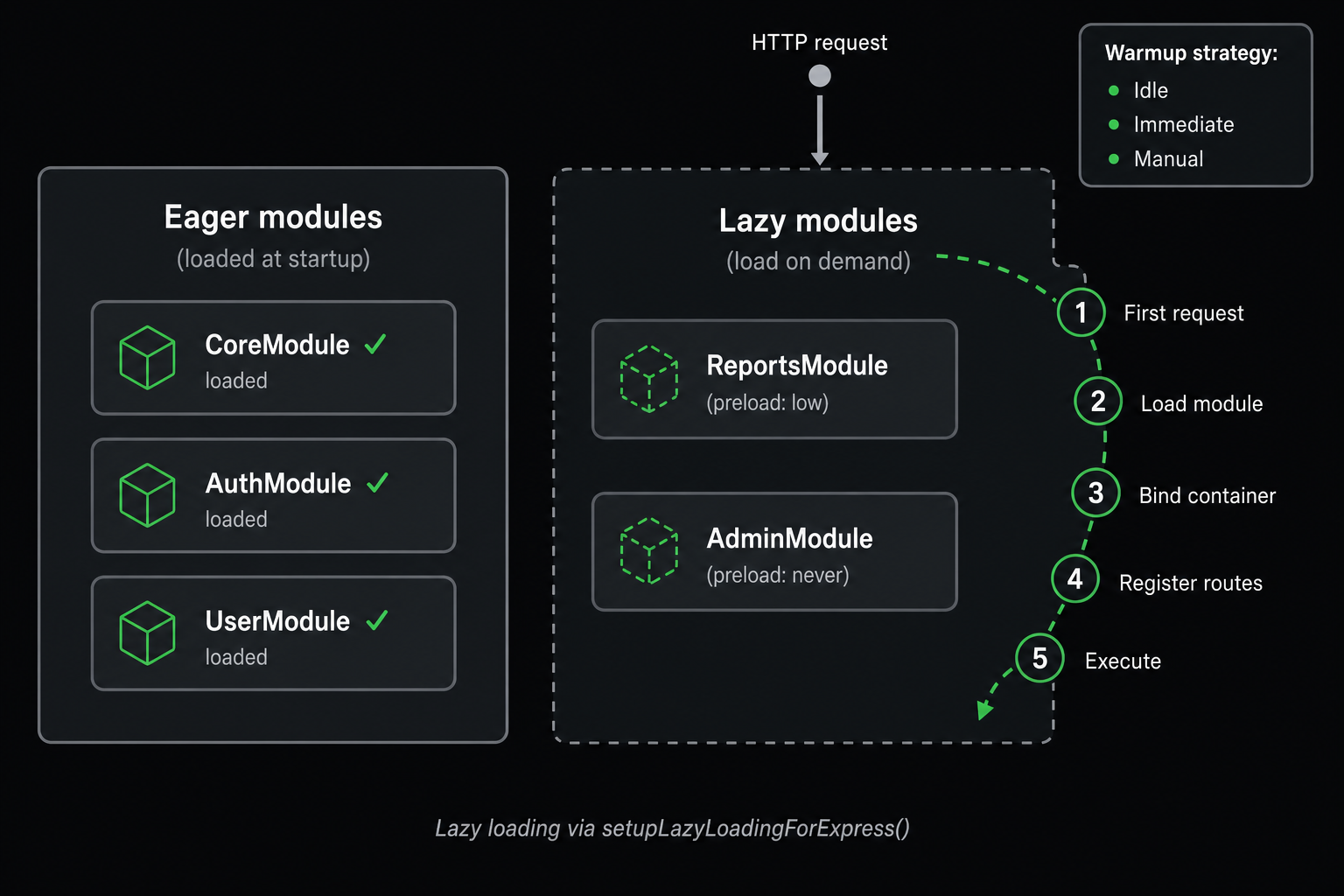
        // Eager modules (loaded at startup)
        CoreModule,
        AuthModule,
        UserModule,

        // Don't add lazy modules here!
    ]);

    async configureServices(): Promise<void> {
        // One-liner setup!
        const { lazyModulesCount, middleware, routeMappings } =
            setupLazyLoadingForExpress(this.container.Container, {
                lazyModules: [ReportsLazyModule, AdminLazyModule],
                globalPrefix: "/api",
                enableMetrics: true,
                enableWarmup: true,
                warmupConfig: {
                    strategy: "idle",
                    delay: 10000,
                    hints: ["low", "medium"]
                }
            });

        // Add auto-load middleware
        if (middleware) {
            this.Middleware.add(middleware);
        }

        console.log(`Registered ${lazyModulesCount} lazy modules`);
        console.log("Auto-detected routes:", routeMappings);
    }
}
3. Define Controllers
Routes are automatically detected from @controller() decorators:
// routes automatically detected!
@controller("/reports")
export class ReportsController {
    @Get("/")
    getAllReports() {
        return { reports: [] };
    }

    @Get("/generate")
    generateReport() {
        return { status: "generating" };
    }
}
No manual route mapping needed! The system automatically:
- Detects
/api/reports/*routes - Maps them to
ReportsLazyModule - Loads module on first access
Auto-Detection System
How It Works
The lazy loading system automatically detects routes from your controllers:
@controller("/admin")
export class AdminController {
    @Get("/dashboard")      // Detected: /api/admin/dashboard
    dashboard() {}

    @Get("/users")          // Detected: /api/admin/users
    users() {}
}
Behind the scenes:
- System scans
@controller()decorators - Extracts route prefixes (
"/admin") - Combines with
globalPrefix("/api") - Maps routes to lazy modules automatically
Result: /api/admin/* → AdminLazyModule
Manual Route Mapping (Optional)
For complex scenarios, provide manual mappings:
setupLazyLoadingForExpress(container, {
    lazyModules: [ReportsLazyModule],
    routePrefixes: {
        ReportsModule: "/reports",  // Manual mapping: module name -> route prefix
    },
    globalPrefix: "/api"
});
Preload Hints
Control when/if modules are preloaded using hints:
Never (Default for Admin Modules)
Never preload - only load when accessed:
const AdminLazyModule = CreateLazyModule(
    [AdminController],
    { name: "AdminModule" }
).withPreloadHint("never");
Use for: Admin panels, rarely-used features
Low Priority
Preload during idle time (low priority):
const ReportsLazyModule = CreateLazyModule(
    [ReportsController],
    { name: "ReportsModule" }
).withPreloadHint("low");
Use for: Features used by some users occasionally
Medium Priority
Preload after initial startup:
const AnalyticsLazyModule = CreateLazyModule(
    [AnalyticsController],
    { name: "AnalyticsModule" }
).withPreloadHint("medium");
Use for: Features used by many users
High Priority
Preload immediately after startup:
const SearchLazyModule = CreateLazyModule(
    [SearchController],
    { name: "SearchModule" }
).withPreloadHint("high");
Use for: Features used by almost all users
Warmup Strategies
Idle Warmup (Recommended)
Preload modules during idle time:
setupLazyLoadingForExpress(container, {
    lazyModules: [ReportsLazyModule, AdminLazyModule],
    enableWarmup: true,
    warmupConfig: {
        strategy: "idle",           // Load during idle
        delay: 10000,               // Wait 10s after startup
        hints: ["low", "medium"]    // Only preload low/medium priority
    }
});
Best for: Most applications (doesn't block startup)
Immediate Warmup
Preload all modules immediately after startup:
warmupConfig: {
    strategy: "immediate",
    hints: ["low", "medium", "high"]
}
Best for: Applications where startup time isn't critical
Scheduled Warmup
Start warmup after a fixed delay:
warmupConfig: {
    strategy: "scheduled",
    delay: 30000,  // Start warmup 30s after setup
    hints: ["low", "medium"]
}
Best for: Deferring warmup until after peak startup traffic
Manual Warmup
Omit warmupConfig and trigger warmup (or load modules) yourself using the instances returned by setup:
const { manager, warmup } = setupLazyLoadingForExpress(container, {
    lazyModules: [ReportsLazyModule, AdminLazyModule],
    enableWarmup: true
    // No warmupConfig: warmup does not start automatically
});

// Later in code
await warmup?.start({ strategy: "immediate", hints: ["low", "medium"] });

// Or load specific modules directly
await manager.load("ReportsModule");
await manager.loadByHint("low");
Best for: Custom warmup logic based on conditions
No Warmup
Only load on-demand (maximum lazy):
enableWarmup: false
Best for: Microservices, minimal memory usage
Advanced Configuration
Prefetch Configuration
Configure when to prefetch modules:
const AdminLazyModule = CreateLazyModule(
    [AdminController],
    { name: "AdminModule" }
)
.withPreloadHint("never")
.withLazyConfig({
    prefetchOn: [
        {
            route: "/dashboard",
            reason: "Admin link visible in menu"
        }
    ],
    prefetchAfterIdle: 30000  // Prefetch after 30s idle
});
Use cases:
- Prefetch when user hovers over link
- Prefetch when user visits dashboard (admin likely next)
- Prefetch after idle timeout
Load Timeout
Configure maximum load time (default is 30000ms):
const HeavyLazyModule = CreateLazyModule(
    [HeavyController],
    { name: "HeavyModule" }
).withLazyConfig({
    timeout: 5000  // 5 second timeout
});
Monitoring & Metrics
Enable Metrics
setupLazyLoadingForExpress(container, {
    lazyModules: [ReportsLazyModule, AdminLazyModule],
    enableMetrics: true  // Enable performance tracking
});
Access Metrics
import { LazyModuleManager, LazyLoadMetrics } from "@expressots/core";

@controller("/diagnostics")
export class DiagnosticsController {
    constructor(
        @inject(LazyModuleManager)
        private manager: LazyModuleManager,
        @inject(LazyLoadMetrics)
        private metrics: LazyLoadMetrics
    ) {}

    @Get("/lazy-loading")
    getStatistics() {
        const stats = this.manager.getStatistics();

        return {
            totalModules: stats.totalModules,
            loadedModules: stats.loadedModules,
            lazyModules: stats.lazyModules,
            failedModules: stats.failedModules,
            avgLoadTime: stats.avgLoadTime,
            recommendations: this.metrics.getRecommendations()
        };
    }
}
Metrics Available:
- Total registered modules
- Loaded / lazy / failed module counts
- Average and total load time
- Estimated memory saved
- Per-module recommendations (via
LazyLoadMetrics)
Real-Time Monitoring
const manager = this.Provider.get(LazyModuleManager);

// Inspect module state
console.log(manager.getLoadedModules());   // ["ReportsModule"]
console.log(manager.getPendingModules());  // ["AdminModule"]
console.log(manager.getFailedModules());   // []

// Check if a module is loaded
if (manager.isLoaded("AdminModule")) {
    console.log("Admin module is ready");
}

// Load a module manually
await manager.load("AdminModule");
Route Mappings
After setup, inspect auto-detected routes:
const { routeMappings } = setupLazyLoadingForExpress(container, {
    lazyModules: [ReportsLazyModule, AdminLazyModule]
});

console.log(routeMappings);
// [
//   { prefix: "/reports", moduleName: "ReportsModule", loaded: false },
//   { prefix: "/admin", moduleName: "AdminModule", loaded: false }
// ]
Prefixes are auto-detected from @controller() decorators. The globalPrefix
(e.g. "/api") is prepended at request-matching time.
Performance Characteristics
Startup Time Reduction
Before Lazy Loading:
Application startup: 2500ms
- CoreModule: 500ms
- AuthModule: 300ms
- UserModule: 400ms
- ReportsModule: 800ms  ← Heavy module
- AdminModule: 500ms    ← Rarely used
After Lazy Loading:
Application startup: 1200ms (52% faster!)
- CoreModule: 500ms
- AuthModule: 300ms
- UserModule: 400ms
- ReportsModule: Lazy (on-demand)
- AdminModule: Lazy (on-demand)
Memory Usage
Before: 450MB (all modules loaded)
After: 280MB (only eager modules loaded)
Savings: 170MB (38% reduction)
First Request Latency
Initial Load: +50-200ms (one-time cost)
Subsequent Requests: 0ms overhead
Warmup: Eliminates first-request latency
Best Practices
1. Identify Good Candidates
✅ Good candidates for lazy loading:
- Admin panels (rarely accessed)
- Reporting modules (heavy, occasional use)
- Feature flags (may not be enabled)
- Premium features (limited user access)
- Analytics dashboards
- Export functionality
- Batch processing endpoints
❌ Poor candidates:
- Authentication modules
- Core API endpoints
- High-traffic routes
- Small, lightweight modules
2. Use Appropriate Hints
// ✅ Good: Logical hints
AdminModule → "never"        // Rarely used
ReportsModule → "low"        // Occasional use
SearchModule → "medium"      // Frequent use
CoreApiModule → "high"       // Critical, but large

// ❌ Bad: Everything "never"
AdminModule → "never"
ReportsModule → "never"
SearchModule → "never"       // Search is frequently used!
3. Configure Warmup
// ✅ Good: Idle warmup for production
warmupConfig: {
    strategy: "idle",
    delay: 10000,
    hints: ["low", "medium"]
}

// ❌ Bad: Immediate warmup (defeats purpose)
warmupConfig: {
    strategy: "immediate",
    hints: ["low", "medium", "high", "never"]  // Loads everything!
}
4. Monitor Performance
// ✅ Good: Enable metrics in development
setupLazyLoadingForExpress(container, {
    enableMetrics: process.env.NODE_ENV === "development"
});

// ❌ Bad: No metrics (can't optimize)
setupLazyLoadingForExpress(container, {
    enableMetrics: false
});
5. Test Lazy Loading
// ✅ Good: Test lazy routes
test("Reports module loads on demand", async () => {
    const response = await request(app)
        .get("/api/reports")
        .expect(200);

    // Verify module loaded
    const manager = container.get(LazyModuleManager);
    expect(manager.isLoaded("ReportsModule")).toBe(true);
});
Migration from Eager Loading
Before (v3 / Eager Loading)
export class App extends AppExpress {
    private config: AppContainer = this.configContainer([
        CoreModule,
        AuthModule,
        UserModule,
        ReportsModule,    // Always loaded (slow startup)
        AdminModule,      // Always loaded (rarely used)
        AnalyticsModule   // Always loaded (heavy)
    ]);
}
Startup: 2500ms
Memory: 450MB
After (v4 / Lazy Loading)
// 1. Create lazy modules
export const ReportsLazyModule = CreateLazyModule([ReportsController], { name: "ReportsModule" }).withPreloadHint("low");
export const AdminLazyModule = CreateLazyModule([AdminController], { name: "AdminModule" }).withPreloadHint("never");
export const AnalyticsLazyModule = CreateLazyModule([AnalyticsController], { name: "AnalyticsModule" }).withPreloadHint("medium");

// 2. Setup
export class App extends AppExpress {
    private config: AppContainer = this.configContainer([
        CoreModule,
        AuthModule,
        UserModule
        // Lazy modules NOT included here
    ]);

    async configureServices(): Promise<void> {
        const { middleware } = setupLazyLoadingForExpress(
            this.container.Container,
            {
                lazyModules: [
                    ReportsLazyModule,
                    AdminLazyModule,
                    AnalyticsLazyModule
                ],
                globalPrefix: "/api",
                enableMetrics: true,
                enableWarmup: true,
                warmupConfig: {
                    strategy: "idle",
                    delay: 10000,
                    hints: ["low", "medium"]
                }
            }
        );

        if (middleware) {
            this.Middleware.add(middleware);
        }
    }
}
Startup: 1200ms (52% faster)
Memory: 280MB (38% reduction)
Troubleshooting
Module Not Loading
Check route mapping:
const { routeMappings } = setupLazyLoadingForExpress(...);
console.log(routeMappings);  // Verify routes detected
Check controller decorator:
// ✅ Good
@controller("/reports")
export class ReportsController {}

// ❌ Bad: No decorator
export class ReportsController {}
Routes Not Auto-Detected
Provide manual mapping:
setupLazyLoadingForExpress(container, {
    lazyModules: [ReportsLazyModule],
    routePrefixes: { ReportsModule: "/reports" }  // Manual mapping
});
Module Loads Too Slowly
Reduce load timeout:
CreateLazyModule([Controller], { name: "Module" })
.withLazyConfig({
    timeout: 3000  // Reduce from default 30000ms
});
Check module dependencies:
- Heavy imports?
- Database connections in constructor?
- Synchronous operations?
Warmup Not Working
Check strategy:
// ✅ Good
warmupConfig: {
    strategy: "idle",
    hints: ["low"]  // Only warm up modules with "low" hint
}

// ❌ Bad: Wrong hint
warmupConfig: {
    strategy: "idle",
    hints: ["high"]  // But module has "low" hint!
}
API Reference
setupLazyLoadingForExpress()
Exported from @expressots/adapter-express:
function setupLazyLoadingForExpress(
    container: Container,
    options?: {
        lazyModules?: ILazyModule[];
        routePrefixes?: Record<string, string>;  // { moduleName: "/prefix" }
        globalPrefix?: string;
        enableAutoLoad?: boolean;   // default: true
        enableMetrics?: boolean;    // default: true in development
        enableWarmup?: boolean;     // default: true
        alwaysLoad?: string[];      // module names to load eagerly
        neverLoad?: string[];       // module names to skip entirely
        logLevel?: "debug" | "info" | "warn" | "error" | "none";
        warmupConfig?: {
            strategy: "idle" | "immediate" | "scheduled";
            delay?: number;
            maxConcurrent?: number;
            priority?: string[];
            hints?: ("low" | "medium" | "high" | "never")[];
        };
    }
): {
    loader: LazyModuleLoader;
    manager: LazyModuleManager;
    metrics?: LazyLoadMetrics;
    warmup?: LazyModuleWarmup;
    middleware?: RequestHandler;
    routeMappings: LazyRouteMapping[];
    lazyModulesCount: number;
    eagerModulesCount: number;
}
CreateLazyModule()
Exported from @expressots/core:
function CreateLazyModule(
    controllers: Array<new (...args: unknown[]) => unknown>,
    config?: {
        name?: string;
        preloadHint?: "high" | "medium" | "low" | "never";  // default: "low"
        timeout?: number;                                    // default: 30000
        prefetchOn?: Array<{ route: string; reason?: string }>;
        prefetchAfterIdle?: number;
        dependencies?: string[];
        routePrefixes?: string[];
        estimatedMemoryUsage?: number;
    }
): ILazyModule
The returned ILazyModule supports the fluent methods
.withPreloadHint(hint) and .withLazyConfig(config), plus load(),
status, isLoaded, loadTime, and error.
There is also createLazyModule(factory, config?) for building a lazy
module from a custom ContainerModule factory.
LazyModuleManager
Exported from @expressots/core:
interface ILazyModuleManager {
    isLoaded(moduleName: string): boolean;
    getLoadedModules(): string[];
    getPendingModules(): string[];
    getFailedModules(): string[];
    load(moduleName: string): Promise<void>;
    loadByHint(hint: "high" | "medium" | "low" | "never"): Promise<void>;
    getStatistics(): ModuleLoadStatistics;
    unload(moduleName: string): Promise<boolean>;
}
Comparison with Other Frameworks
| Feature | ExpressoTS | NestJS | Spring Boot |
|---|---|---|---|
| Zero-Config | ✅ Auto-detection | ❌ Manual | ❌ Manual |
| One-Liner Setup | ✅ Yes | ❌ Complex setup | ❌ Complex setup |
| Preload Hints | ✅ 4 priorities | ❌ Not available | ❌ Not available |
| Warmup Strategies | ✅ 3 strategies | ❌ Not available | ⚠️ Custom only |
| Auto Route Detection | ✅ From decorators | ❌ Manual | ❌ Manual |
| Performance Metrics | ✅ Built-in | ❌ Custom only | ⚠️ Via actuator |
| Prefetch Hints | ✅ Built-in | ❌ Not available | ❌ Not available |
Support the Project
ExpressoTS is MIT-licensed open source. See the support guide to contribute.